Overview
To help keep goals transparent and tracking accurate, Keka now updates the status of goals and sub-goals automatically based on your progress. Whether you're working manually or via integrations, you’ll get a clearer picture of where things stand.
Navigating to the Status Field
To access this feature:
Go to the Performance module
Click on the Goals tab
Select any goal or sub-goal
Look for the Status field
You’ll see that status updates automatically once progress is entered or synced.
Status Definitions
These are the statuses you'll see, and when they apply:
| Status | What it Means |
|---|---|
| On Track | Progress is meeting or exceeding what was planned according to timeline or targets. |
| Needs Attention | Progress is lagging compared to what's expected; it’s a signal to re-focus or adjust. |
| At Risk | The goal is seriously behind or facing issues; urgent action is needed. |
Automatic Status Updates & Integrations
Whenever goal or sub-goal progress is updated—manually or through tools like JIRA or Google Sheets—Keka recalculates and updates status based on the new progress.
-
This means you don’t need to remember to update the status separately; it reflects the most recent progress automatically.
-
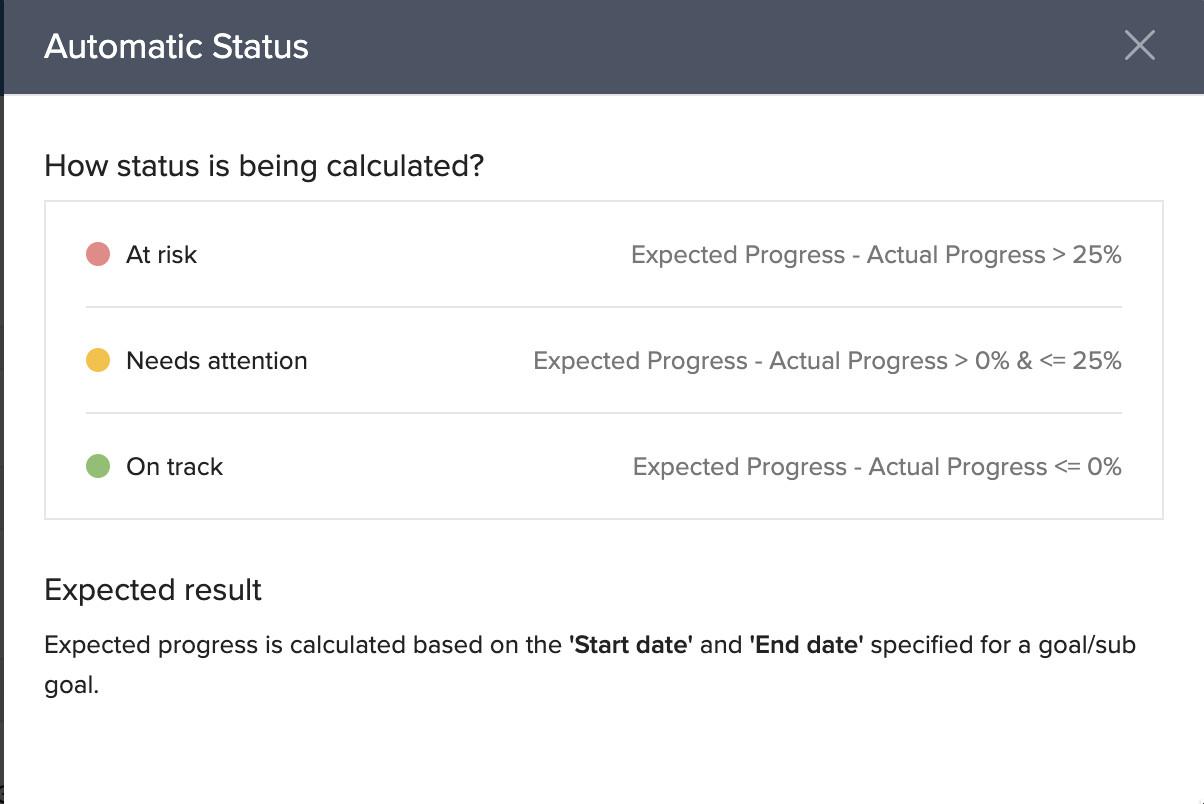
For more detail on how Keka calculates the status thresholds, click "How it works?" beside the status field. While these thresholds are not customisable, this visibility helps you understand what progress level triggers each status.
Manual Override
Even with automatic updates, you retain control:
You can still manually set or change a status if you feel that the automatic status doesn’t reflect context (e.g. external dependencies, delays not captured by % progress).
This lets you account for nuances beyond raw numbers.
Notes & Tips
Tip: Use integrations where possible to keep updates frequent and reduce manual work.
Important: Automatic updates rely on accurate progress metrics. If the % progress isn’t maintained properly, status could misrepresent the real situation.
Next Steps
Review and confirm what progress metrics you are using (manual updates vs integrations).
Check the thresholds Keka uses in “How it works?” to ensure they meet your expectations.
Train your team or leads on when/how to use manual override.
Comments
0 comments
Please sign in to leave a comment.