Introduction
We’ve enhanced the Inbound Candidate Owner Assignment feature with a new option: Round-Robin Candidate Owner Assignment.
This update ensures candidate ownership is distributed fairly among recruiters, improving efficiency, reducing manual effort, and providing a better candidate experience — all while helping you hire faster.
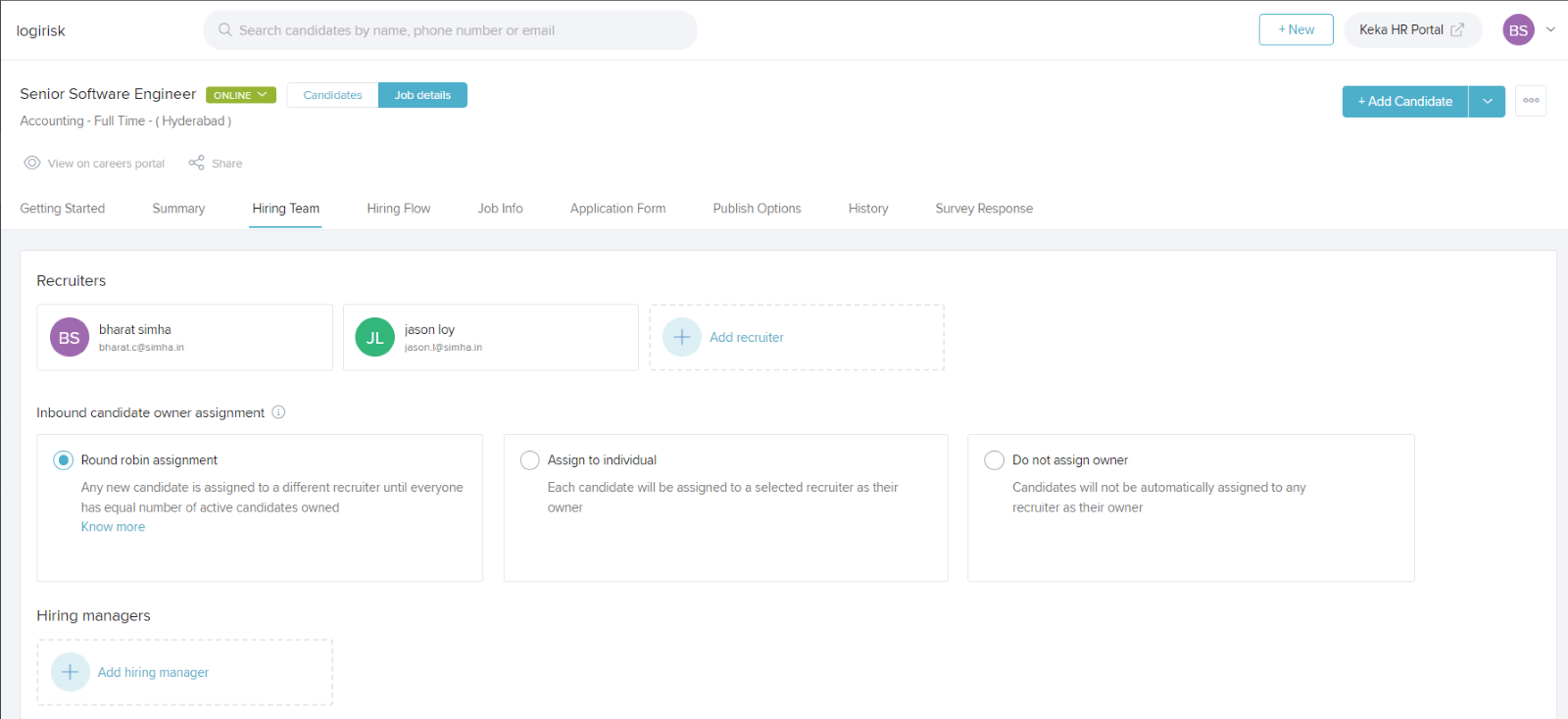
How to Use Round-Robin Candidate Owner Assignment
To enable Round Robin:
Go to the Hiring Team section when creating or editing a job.
Under Inbound Candidate Owner Assignment, select Round Robin.
The system will:
Assign new candidates to the recruiter with the fewest active candidates.
Rotate automatically when a recruiter reaches the maximum limit of active candidates.
Ensure each recruiter has an equal share of active candidates.
Note: This feature only works if there are at least two recruiters on the job, and it applies only to online and confidential jobs.
Options for Candidate Owner Assignment
You now have three options to choose from when setting up candidate ownership for a job:
Round Robin (New)
Distributes candidates equally among recruiters.
Assigns to the next recruiter in rotation based on active candidate load.
Balances workload automatically.
Assign to Individual
All inbound candidates for the job are assigned to one designated recruiter.
Example: If “John Smith” is selected, all applicants for the job go directly to John Smith.
Do Not Assign Owner
Candidates enter the system without an assigned recruiter.
A team member must manually assign ownership later.
Examples
Here’s how each option works in practice for a job posting:
Round Robin Assignment:
If three recruiters are part of the hiring team:Candidate 1 → Recruiter A
Candidate 2 → Recruiter B
Candidate 3 → Recruiter C
Candidate 4 → back to Recruiter A (and so on, until each recruiter has equal active candidates).
(Active candidates = those in the hiring stages, not preboarding, hired, or archived.)
Assign to Individual:
If John Smith is selected as the recruiter, all inbound candidates for the job will be assigned directly to him.Do Not Assign Owner:
No recruiter is automatically assigned. Candidates must be manually distributed by the hiring team.
Notes & Tips
Tip: Use Round Robin when multiple recruiters are collaborating on a job. It ensures fairness and avoids overloading any single recruiter.
Important: This feature applies to inbound candidates from all sources — your career portal, internal referrals, email sourcing, and more.
Next Steps
Explore the Round Robin option in your next job posting to streamline candidate assignment and speed up your hiring process.
Comments
0 comments
Please sign in to leave a comment.