Your Skills Profile in Keka now allows you to maintain an up-to-date record of your professional skills, proficiency ratings, certifications, and experience. Keeping your profile updated helps showcase your expertise, support career development conversations, and improve visibility into your strengths across the organisation.
This article explains how to view, assign, update, and manage skills in the new My Skills experience.
Note: The video will be updated shortly with the new UI. Meanwhile, refer to this article for the latest skills management experience. Access Your Skills Profile
- Navigate to Me.
- Click Performance.
- Select Skills.
You will be redirected to My Skills section.
The My Skills page displays your complete skill profile.
Understanding the My Skills Dashboard
At the top of the page, you can view a summary of your skills profile.
Total Skills
Displays the total number of skills assigned to your profile.
Total Category Count
Shows the number of skill categories represented across your skills.
Average Rating
Displays your average proficiency rating across all assigned skills.
Pending Requests
Shows the number of skill updates awaiting approval.
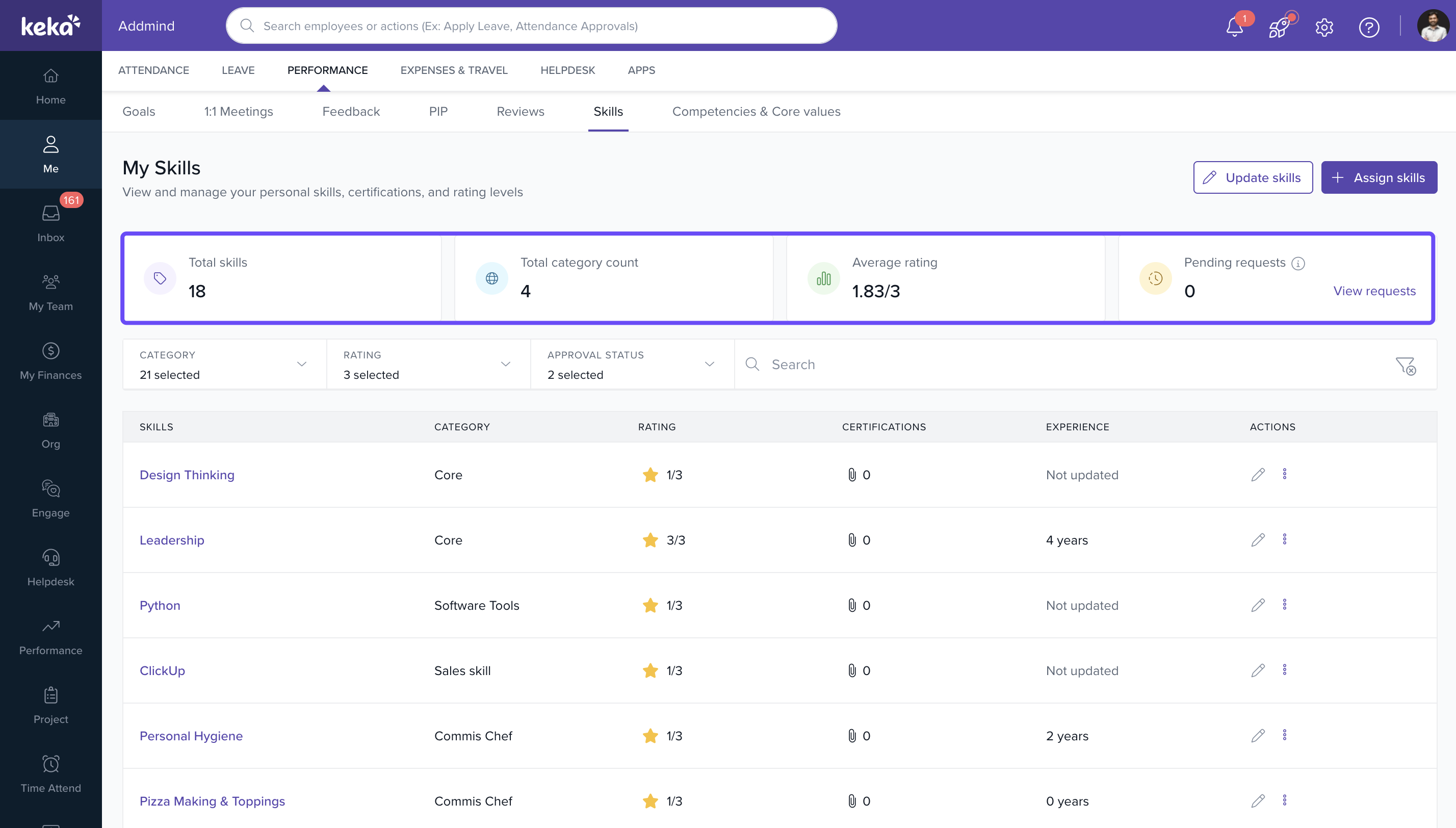
Click View Requests to track the status of submitted skill update requests.
Search and Filter Skills
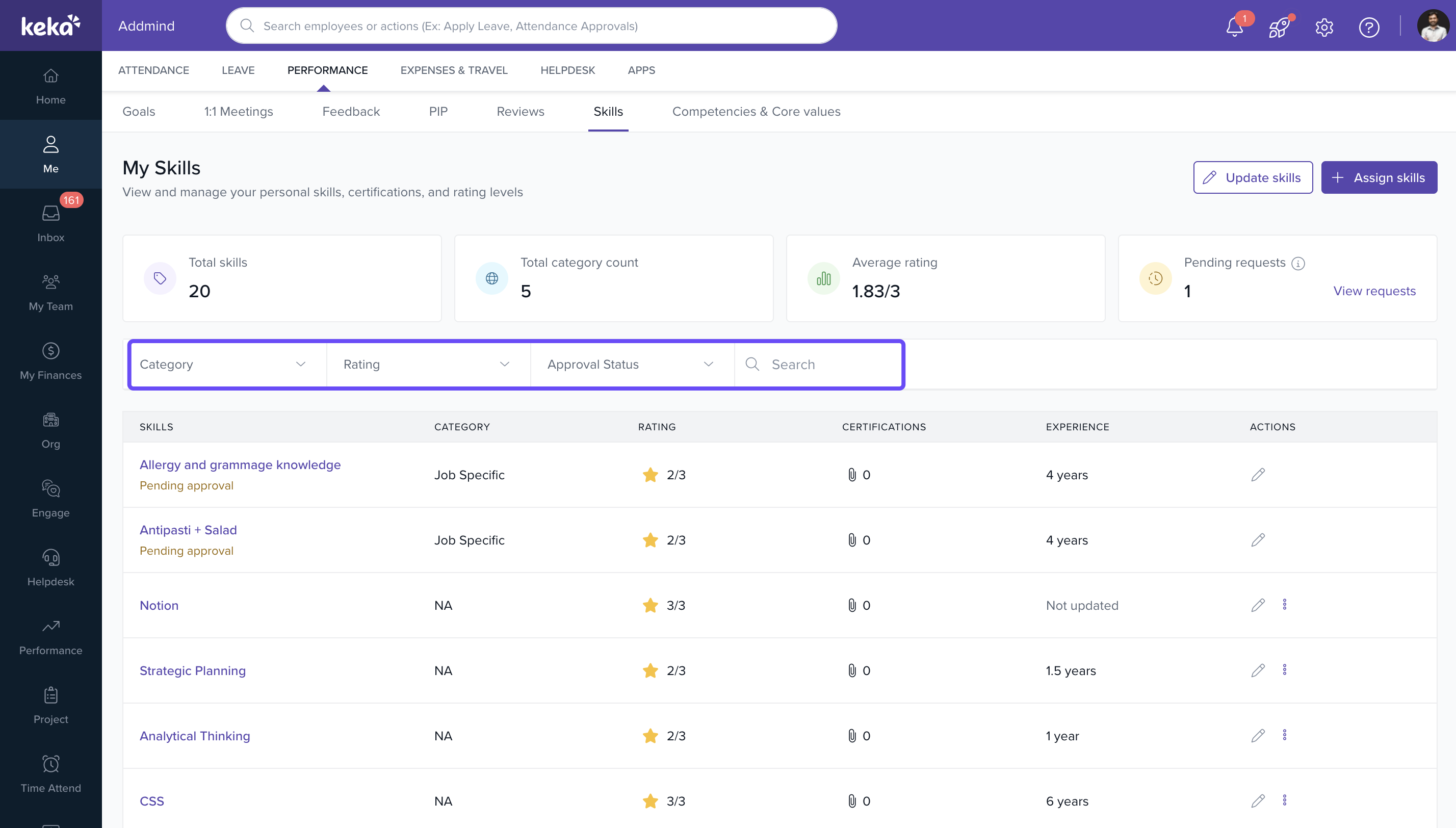
Use the available filters to quickly find relevant skills.
Category
Filter skills based on skill categories.
Rating
Filter skills based on proficiency levels.
Approval Status
Filter skills based on approval state.
Search
Search for a specific skill using keywords.
Note: Skills displayed in your profile are sourced from the organisational Skills Repository and may be grouped based on the hierarchy configured by your organisation.Understanding the Skills Repository
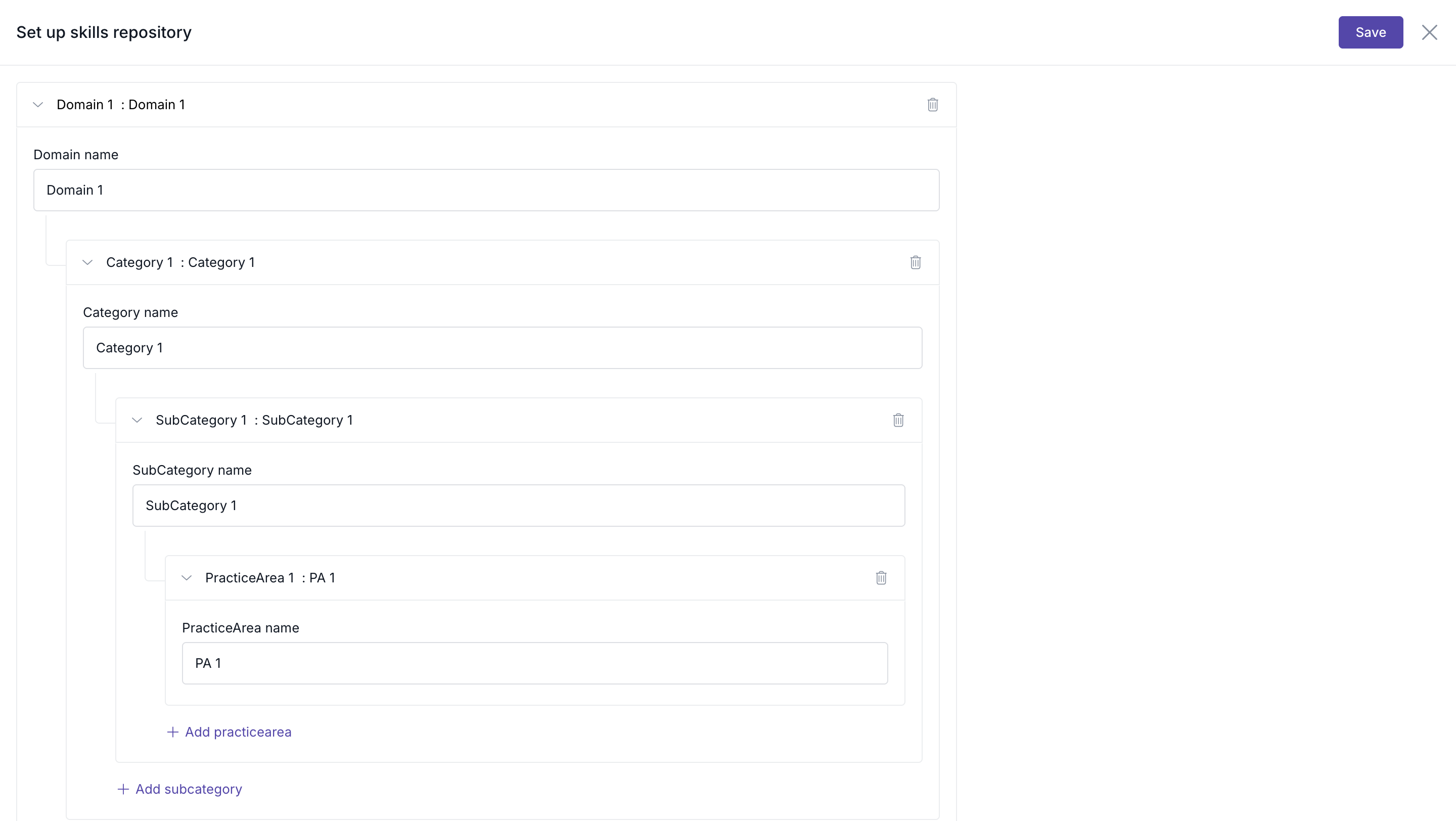
The Skills module now uses a centralised Skills Repository to manage organisational skills.
All skills available for assignment are maintained within the repository and organised using a structured hierarchy. Depending on your organisation's setup, skills may be grouped under levels such as:
- Domain
- Category
- Subcategory
- Practice Area
This structured approach helps you:
- Find relevant skills more easily.
- Select skills from a standardised repository.
- Avoid duplicate or inconsistent skill entries.
- Maintain an accurate and organised skills profile.
When assigning a skill, you can view the associated category and select skills from the repository rather than creating skills manually.
You can also create a new skill if it is not available in the repository by clicking on +Add Skills under Perform > Skills > Repository tab (subject to permissions).
The repository ensures that all assigned skills follow a standardized organizational framework.
Note: The skills available in the repository are managed by your organization and may vary depending on the configured hierarchy structure.Assign Skills to Your Profile
You can assign new skills to your profile directly from your organisation's Skills Repository. Repository skills are organised using a structured hierarchy, making it easier to locate and select relevant skills.
To assign skills:
- Navigate to Performance and click on Skills.
- Under Skills, go to My Skills.
Click +Assign skills.
The skill assignment workflow consists of two steps.
Select Skills
In the Select Skills screen, you can:
- Search for skills using the search bar.
- Filter skills by category.
- Select one or more skills from the repository.
- View the category associated with each skill.
- Use Select All to select multiple skills.
If the required skill is not available, click +Create New Skill.
After selecting the required skills, click Continue.
Add Skill Details
After selecting skills, the Add Details page opens.
For each selected skill, enter:
- Experience in years
- Certifications (optional)
To upload a certificate:
Click +Add Certificate.
Fill in the certificate details, including the Certificate Name, Issuing Organisation, Issue Date, Expiration Date, Certificate ID, and Certificate URL. Click Add Attachment to attach the certificate, and then click Add to save the details.
Once done, click on Assign Skills.
The selected skills will be added to your profile.
Depending on your organisation's settings, the assigned skill may require approval before it becomes active.
Manage Individual Skills
You can update a specific skill directly from the skills list.
Edit Skill Details
- Locate the skill you want to edit.
Click the Edit icon in the Actions column.
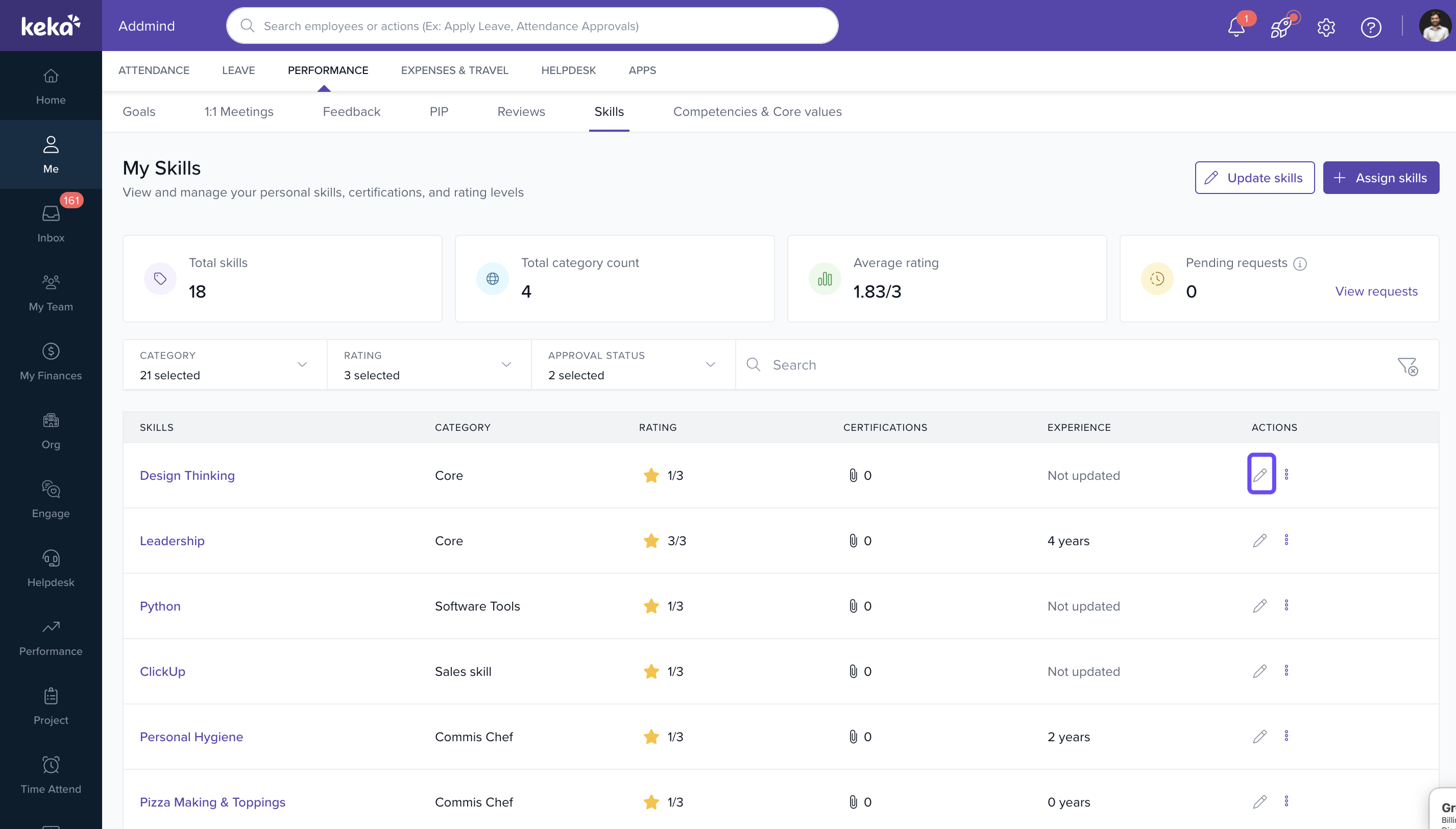
- Update:
- Experience
- Rating
- Certifications
Click Save Details.
The updates will either be applied immediately or routed for approval, depending on your organisation's configuration.
Unassign a Skill
You can remove skills that are no longer relevant from your profile.
- Locate the skill.
- Click the More Actions (three-dot menu).
Select Unassign skill.
- Review the confirmation message.
Click Confirm.
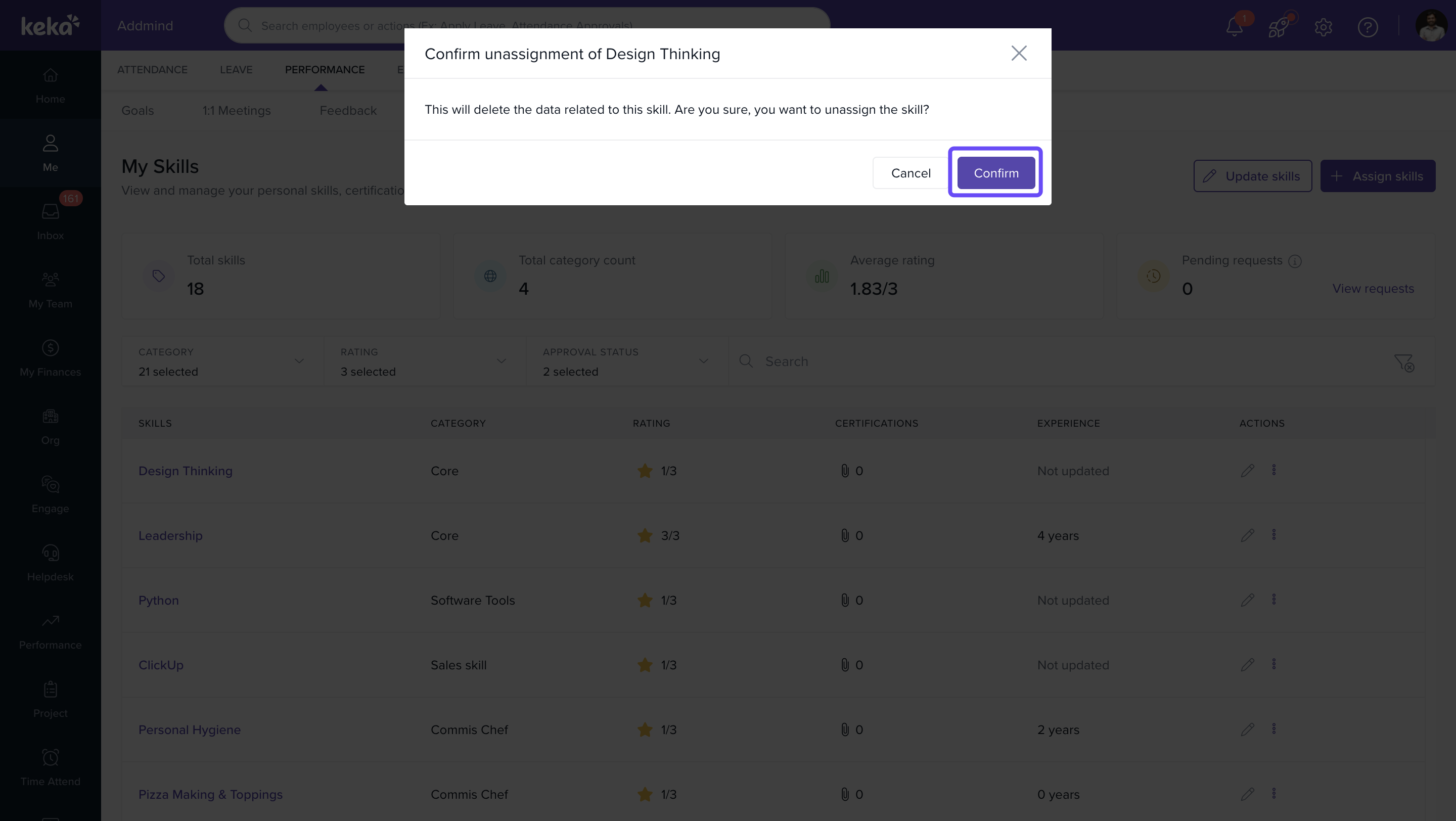
Important: Unassigning a skill permanently removes all associated information, including ratings, certifications, experience records, and related data for that skill.Update Skills in Bulk
If you need to update multiple skills simultaneously, use the bulk update option.
- Navigate to Performance and click on Skills.
- Under Skills, go to My Skills.
Click Update Skills.
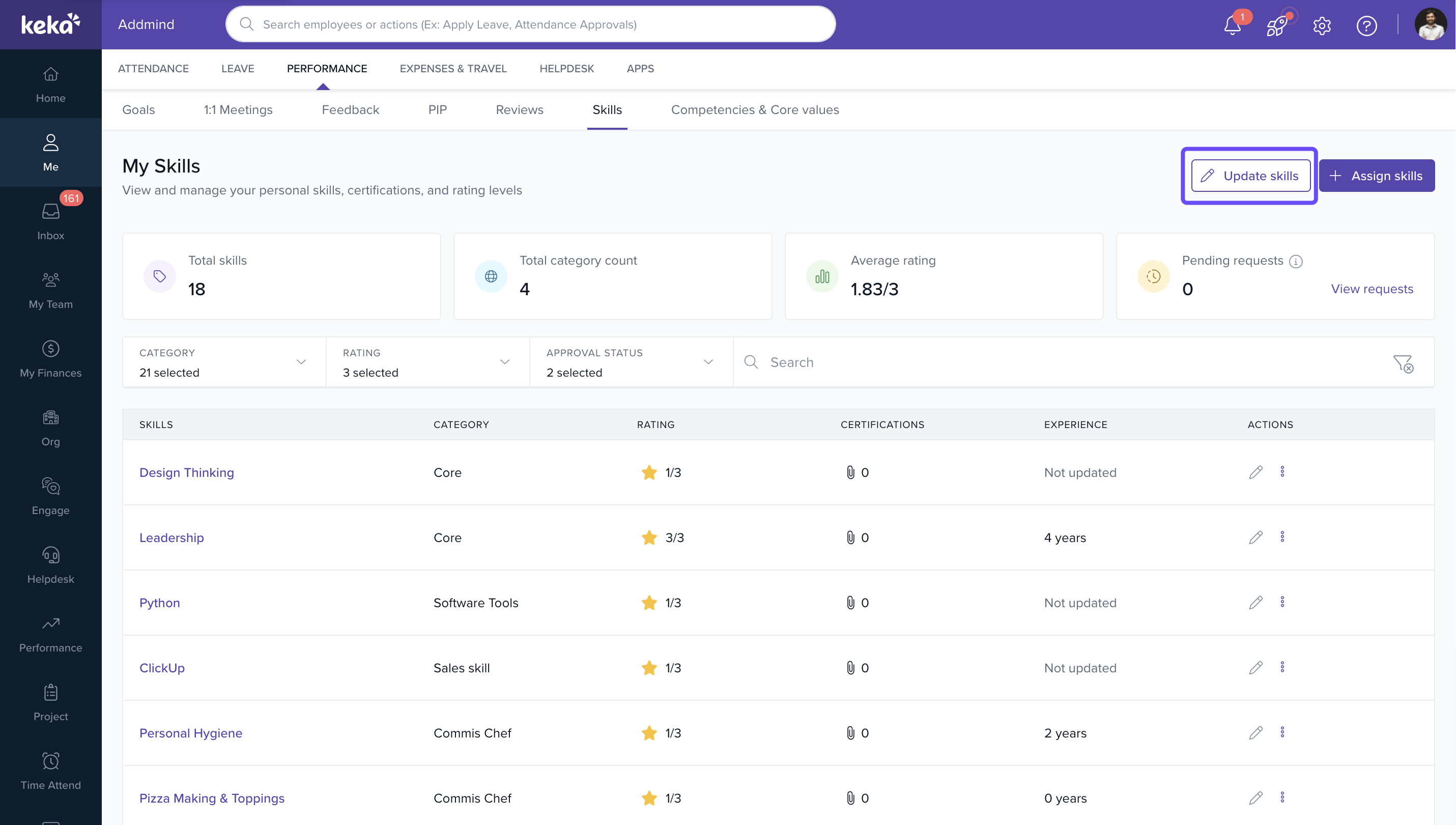
The Update Skill Details page displays all assigned skills.
For each skill, you can update:
- Experience
- Rating
- Certifications (optional)
Once all changes have been made:
- Review the information.
Click Save details.
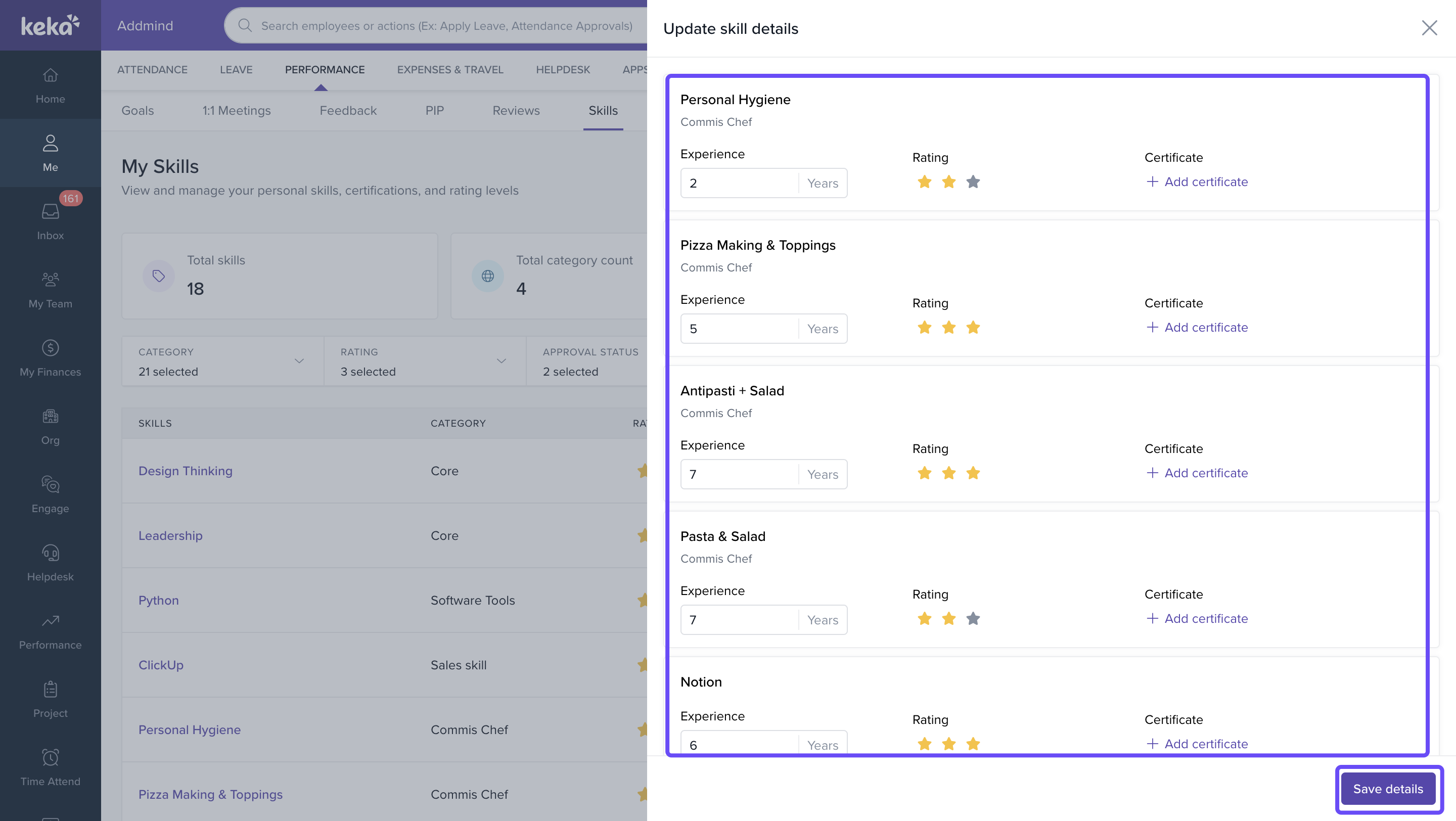
This helps keep your entire skills profile up to date from a single screen.
Manage Skill Requests
If your organisation uses an approval workflow, all submitted skill updates can be tracked under Skill Requests.
To access your request history:
- Navigate to My Skills.
- Click View requests under the Pending Requests section.
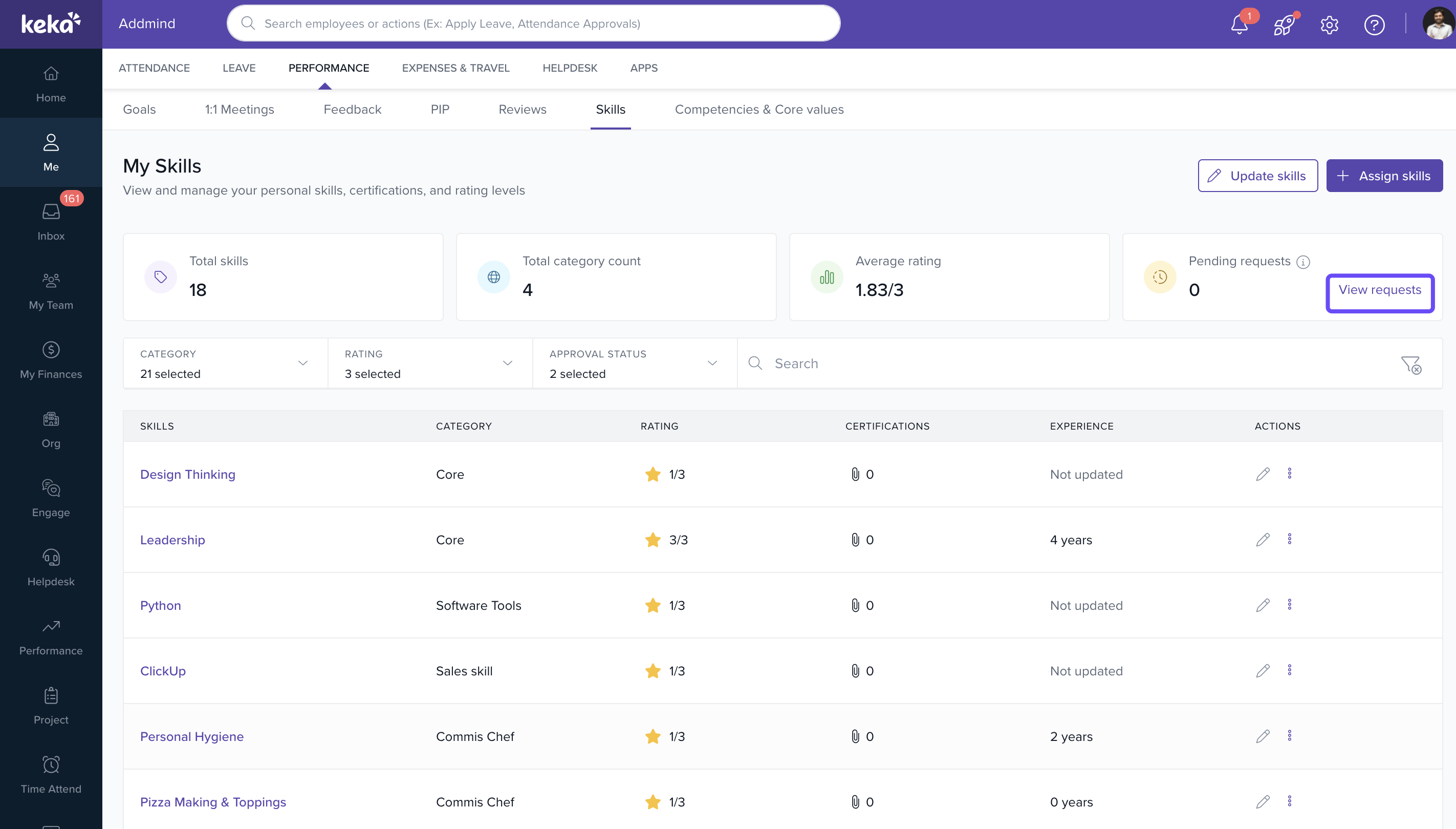
The Skill Requests window includes two tabs.
Pending Requests
The Pending requests page displays:
- Skills awaiting approval.
- Approver name under Waiting On.
- Request date.
Available actions.
You can monitor the status of submitted requests until they are reviewed.
Edit a Pending request
If a submitted request has not yet been approved or rejected, you can update the request before it is processed.
To edit a request:
- Navigate to View requests and go to Pending requests tab.
- Locate the request you want to modify.
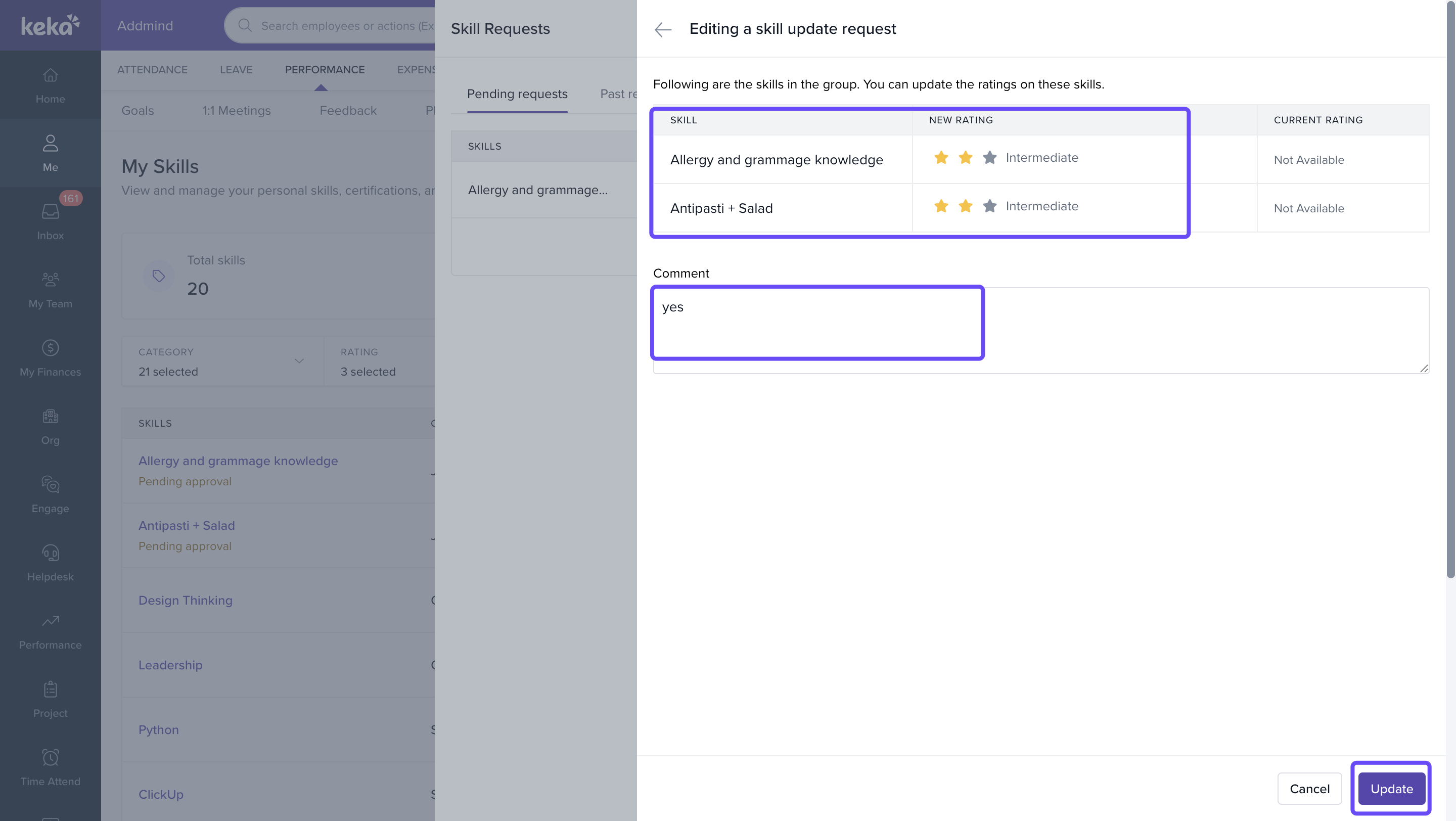
Click Edit request.
The Editing a Skill Update Request page displays all skills included in the request.
You can:
- Update skill ratings.
- Modify the request comment.
- Review the current rating and proposed rating.
After making the required changes:
Click Update.
- The modified request is resubmitted for approval.
This allows you to correct or refine submitted skill updates without creating a new request.
Cancel a Pending request
If a submitted request is no longer required, you can cancel it before approval.
To cancel a request:
- Navigate to View requests and go to Pending requests.
- Click the More Actions (three-dot menu).
Select Cancel request.
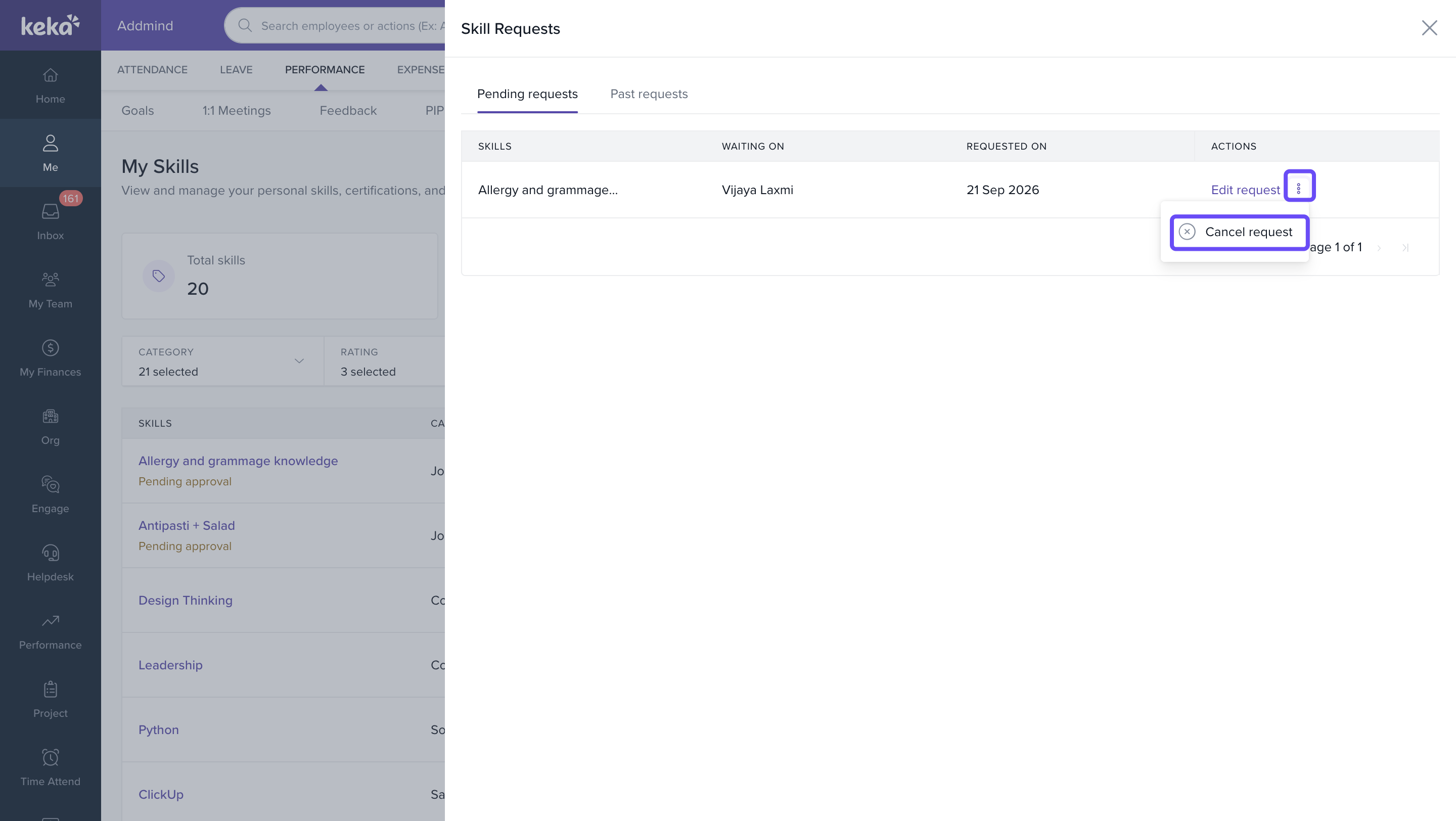
- Review the confirmation message.
Click Confirm.
The request is removed from the approval queue and will no longer be processed.
Note: Only requests that are still awaiting approval can be cancelled. Approved or rejected requests cannot be modified or cancelled.
View Past requests
The Past requests tab provides a complete history of previously processed skill requests.
For each request, you can view:
- Skills updated.
- Submitted comment.
- Request date.
- Approval status.
Rejection notes (if applicable).
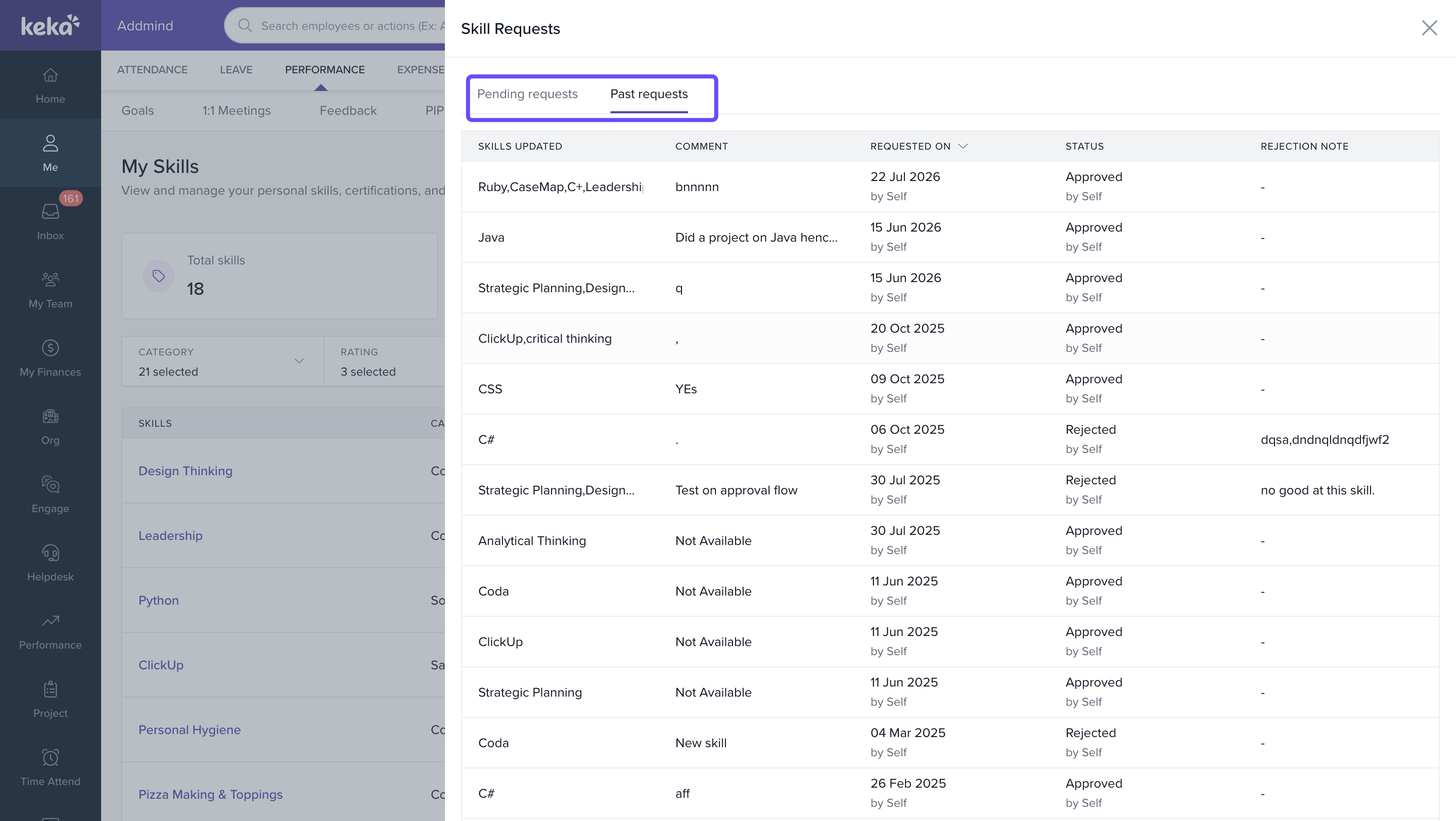
This helps track all historical skill changes made to your profile.
Understanding Skill Approval Workflows
Some organisations require approval before skill updates are reflected in employee profiles.
When submitting a skill change:
- You may be prompted to provide a comment.
- The request is sent to the approver.
- The request appears under Pending Requests.
- Once approved, the changes are reflected in your profile.
If rejected, the rejection reason will be visible under Past Requests.
Notes & Best Practices
- Keep your skills profile updated regularly.
- Add newly acquired skills as soon as possible.
- Maintain accurate experience levels.
- Upload certifications whenever available.
- Use realistic proficiency ratings that reflect your current expertise.
- Review pending requests periodically.
- Remove outdated skills that are no longer relevant to your role.
Tip: Your skills profile helps managers understand your strengths and identify opportunities for projects, career growth, and learning initiatives.

Important: If your organisation uses approvals, provide meaningful comments while submitting skill updates to help approvers review requests faster.
Frequently Asked Questions
1. Can I add new skills to my profile?
Yes. Click Assign Skills and select skills from the repository.
2. Can I edit an existing skill?
Yes. Use the Edit icon beside the skill to update experience, ratings, and certifications.
3. Can I update multiple skills at once?
Yes. Use the Update Skills option to update all assigned skills from a single screen.
4. Why don't I see my updates immediately?
Your organisation may require approval before skill updates become active.
5. How can I check the status of my skill update requests?
Click View Requests under the Pending Requests section.
6. Can I remove a skill from my profile?
Yes. Use the Unassign Skill option available under the skill's More Actions menu.
7. Can I upload certificates against a skill?
Yes. Use Add Certificate while assigning or updating a skill.
8. Can I view previously approved or rejected requests?
Yes. The Past Requests tab displays the complete history of processed requests.
9. What is the Skills Repository?
The Skills Repository is the centralised library of skills maintained by your organization. All skills available for assignment in your profile are sourced from this repository and organized using a structured hierarchy.
10. Can I view the category associated with a skill?
Yes. While assigning skills, you can view the category information associated with each repository skill, helping you select the most relevant skill for your profile.
12. Why do I see skills grouped under categories?
The new Skills experience uses a structured repository that organises skills into hierarchy levels such as Domains, Categories, Subcategories, and Practice Areas. This makes skills easier to search, manage, and maintain across the organisation.
Conclusion
The revamped My Skills experience provides a centralised place to manage your skills, ratings, certifications, and experience. With enhanced filtering, skill assignment workflows, bulk updates, and request tracking, you can maintain an accurate and up-to-date skills profile that supports your professional growth and visibility within the organisation.
Comments
0 comments
Please sign in to leave a comment.