Overview
In this guide, you will learn:
- How Estimated Billing Fees enhance revenue analytics in Keka PSA
- How these fees are calculated for different project types
- How to view and switch between invoiced and estimated data
Who Can Do This?
- Project Managers
- Finance Admins
- PSA Admins with access to the Analytics module
Pre-requisites
- Billing and Invoicing module must be active for full toggle functionality
- Timesheet hours must be approved and rate cards configured
Step-by-Step Instructions
Access Revenue Analytics
- Navigate to the Projects section in the left navigation pane.
- Click on Analytics, then select Insights.
View Estimated Billing Fees
- In the Revenue per Client metric, locate the toggle to switch between:
- Invoiced Amount (actual billed revenue)
- Estimated Billing Fees (forecasted revenue)
- Customers without Billing & Invoicing will see Estimated Billing Fees by default.
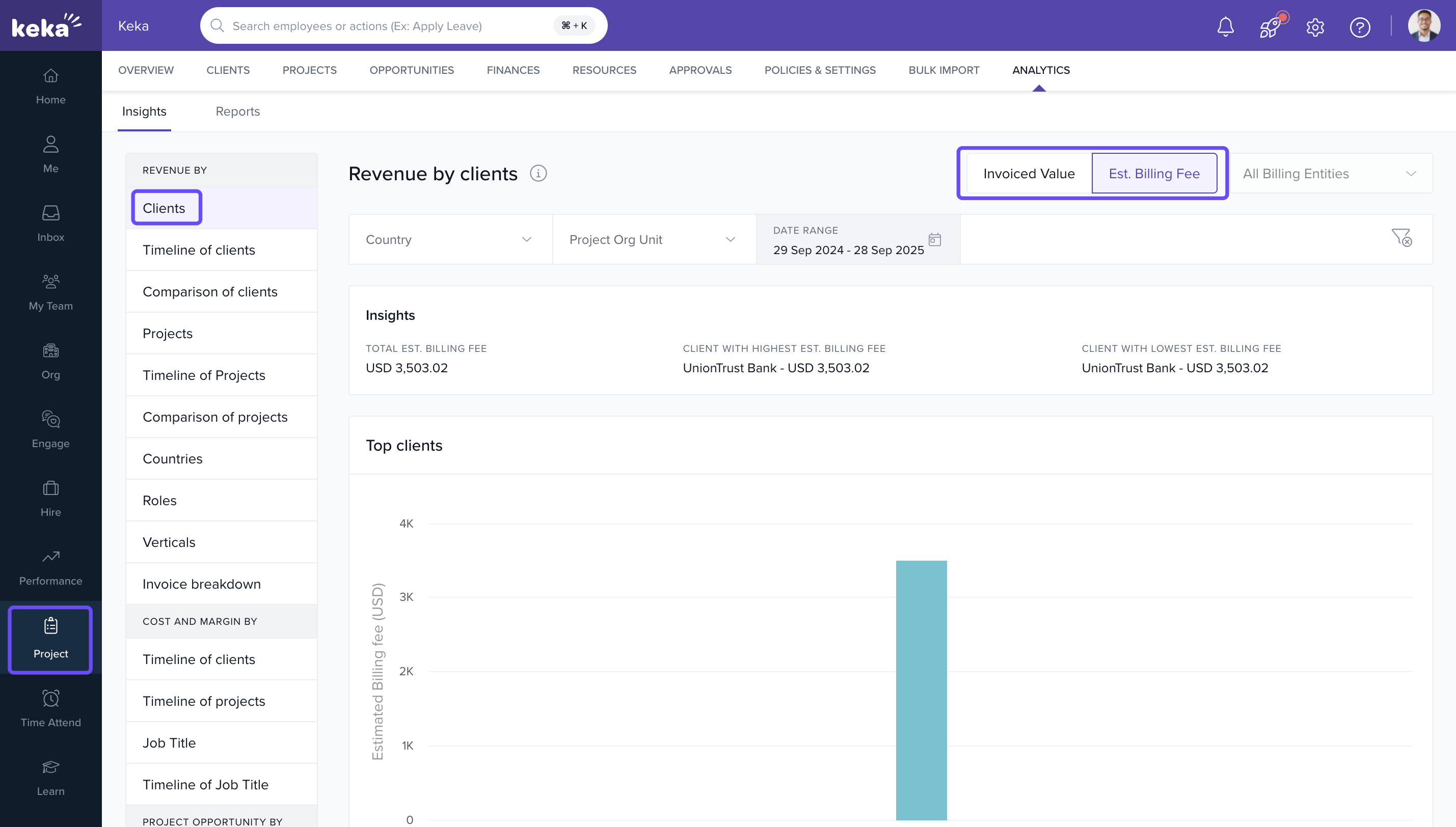
Analyse the Data
- Use filters like client name, date range, project, or role to refine your view.
- Compare estimated vs. invoiced revenue to assess performance and forecast accuracy.
How Estimated Billing Fees are Calculated
| Project Type | Calculation Method |
|---|---|
| Time & Material Projects | Approved hours × employee rate from the rate card. Adjusts for role/rate changes based on effective date. |
| Fixed Fee / Milestone | Based on milestone fees and estimated billing dates associated with the project. |
How It Connects with Other Modules
- Billing & Invoicing: Pulls invoiced data and estimated billing details for side-by-side comparison.
- Timesheets: Approved hours feed directly into Estimated Billing Fees for T&M projects.
- Projects: Fetches milestone and billing date info for fixed fee project estimates.
FAQs
-
Q: I don’t see the toggle in Revenue Analytics. Why?
A: You may not have the Billing & Invoicing module activated. In that case, Estimated Billing Fees will be shown by default. -
Q: How are historical rate changes handled?
A: The system calculates billing based on the effective date of rate changes per role, ensuring accurate estimates. -
Q: Can I export both metrics?
A: Yes, both Invoiced and Estimated Billing Fees data can be exported from the Analytics dashboard. -
Q: Why is my estimated billing higher than invoiced?
A: This usually indicates ongoing work that hasn’t yet been invoiced. Check project timelines and billing milestones.
Troubleshooting
-
Data seems off in Estimated Billing Fees?
o Ensure all approved timesheet hours are logged.
o Verify that rate cards are up-to-date with the correct effective dates. -
No Estimated Fees for Fixed Fee Projects?
o Check if milestones and estimated billing dates have been defined in the project setup.
Comments
0 comments
Please sign in to leave a comment.