What’s New?
Project Managers and Resource Managers no longer need to manually end allocations when a project wraps up. With this new update, the system prompts you to automatically end all active resource allocations the moment a project is marked as Completed. This ensures clean data, reduces manual effort, and keeps PSA resource planning streamlined and accurate.
Who Benefits from This?
-
Project Managers struggling with outdated plans
-
Resource Managers needing accurate availability data
-
PSA Admins focused on maintaining data hygiene
Why This Matters
-
PMs were facing inflated project costs due to ongoing allocations
-
Teams had to manually end allocations one by one even after closure
-
This automation reduces effort, eliminates errors, and keeps PSA tidy
-
Helps with better planning decisions by showing real-time availability
How It Works
When marking a project as Completed, users will now see two checkboxes:
-
Set project end date – Defaults to today or last time entry
-
End resource allocations – Defaults to today or last time entry
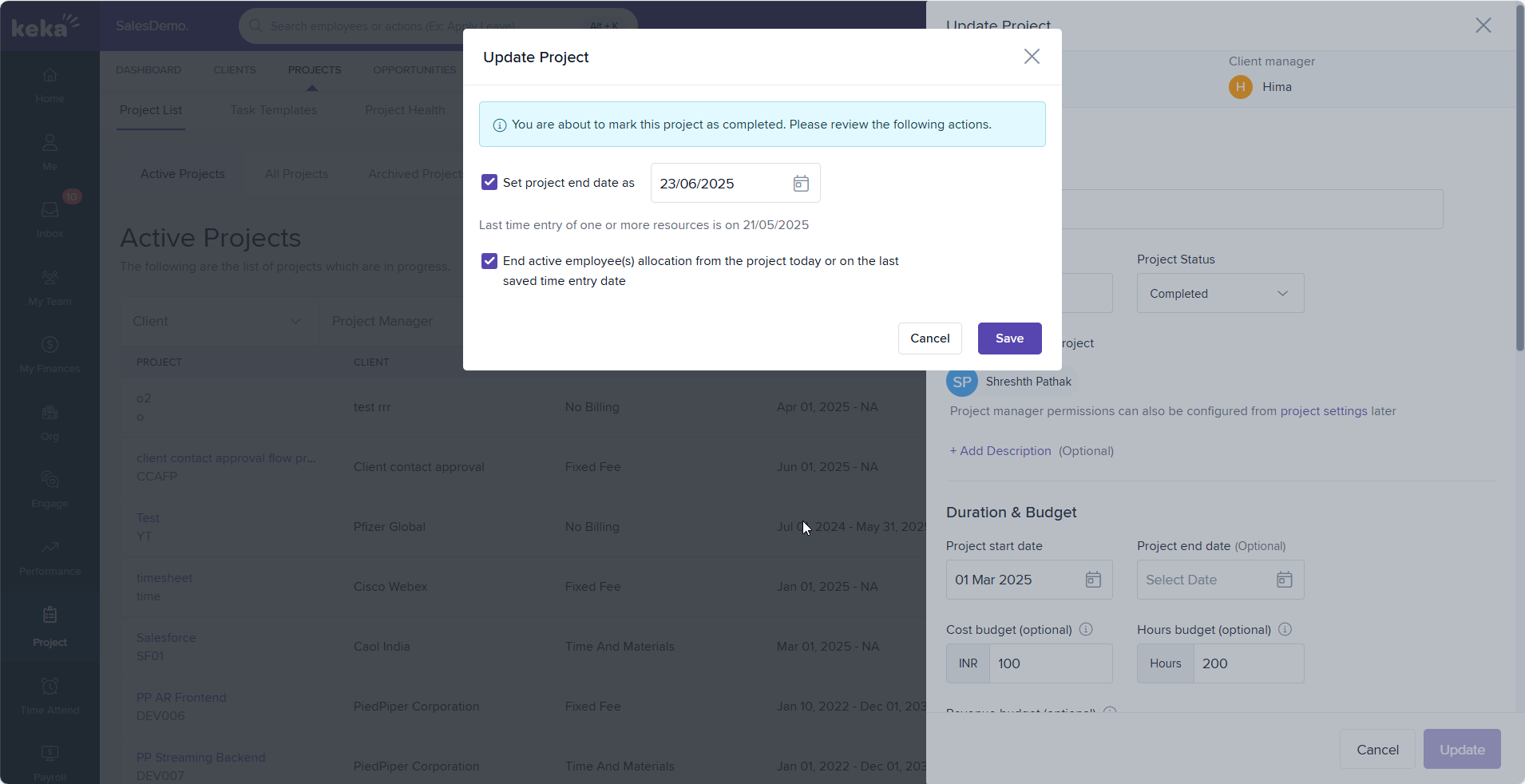
Date pickers are smart! They validate your selection so you can’t accidentally choose a date before the last time entry- ensuring everything lines up cleanly and accurately.
Available On:
All PSA Plans
Related Documentation:
To know more aboutUpdating Project Status, click on:

Please let us know if you find this article helpful.
Comments
0 comments
Please sign in to leave a comment.