Introduction
Earnings and deductions are key components of employee compensation. In Keka, you can easily set up, customize, and manage these components to ensure accurate payroll processing and compliance.
This guide explains how to view, add, and manage different earning and deduction types in your Keka account.
Navigate Earnings & Deductions
- Log in to your Keka account.
- From the dashboard, go to Payroll > Settings.
- Click on Earnings & Deductions.
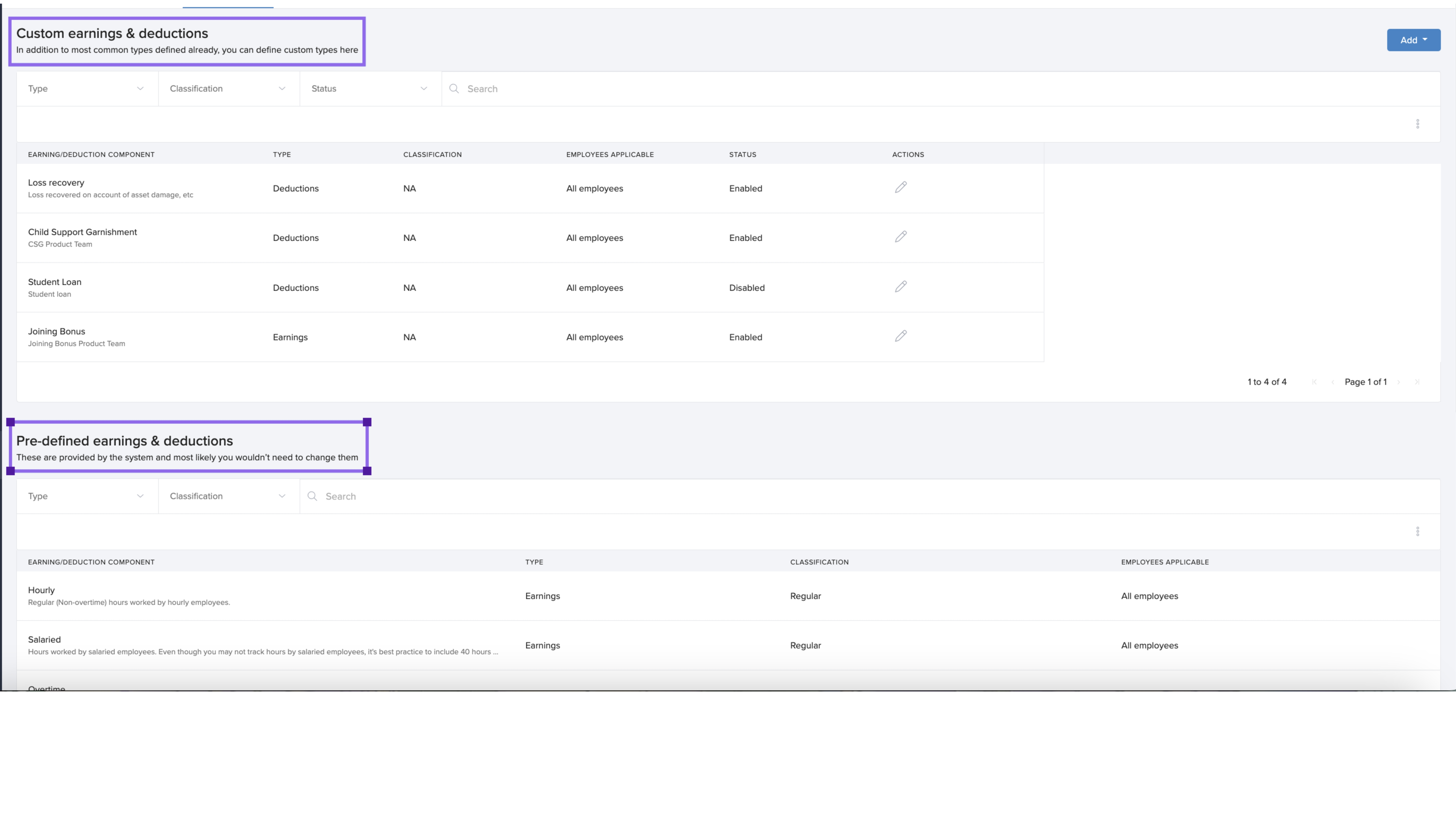
This section shows a list of predefined and custom earnings and deductions your organization uses. You can add new items or manage existing ones.
Earnings
Earnings are amounts paid to employees before deductions. These can include:
- Basic Salary/Wages: Regular fixed pay.
- Overtime: Extra pay for hours beyond standard work time.
- Bonuses and Commissions: Incentives for performance or sales.
- Allowances: Payments like housing or travel allowance.
Keka includes several predefined earning types such as:
- Cash Tips
- Group Term Life
- Other Imputed
- Non-Hourly Regular
These come with preset fields to simplify payroll setup.
Deductions
Deductions are amounts withheld from gross earnings for taxes, benefits, or other obligations.
They are grouped as:
- Mandatory: Statutory deductions like income tax.
- Voluntary: Items like health insurance or retirement savings.
 Add an Earning Type
- Click the Add button.
- Select Add Earning Type.
Fill in the following details:
| Field | Description |
|---|---|
| Name of the Earning | A label for the new earning type. |
| Earning Classification | Choose a category like Bonus, Commission, Tip, etc. |
| Taxability | Automatically set based on classification. |
| Effective Date | When the earning becomes active in the employee’s pay structure. |
Click Save to create the earning type..gif)
Note: New earning types are enabled by default and will be included in upcoming pay periods. You can disable them if needed.
Add a Deduction Type
- Click Add Deduction Type.
Enter the required details:
| Field | Description |
|---|---|
| Name of the Deduction | A descriptive name for the deduction. |
| Deduction Type | Choose Child Support Garnishment or Miscellaneous. |
| Description | What this deduction covers. |
| Note to Employee (optional) | A message visible to employees. |
| Applicability | Specify eligible employees or groups. |
| Taxability | Set whether it is pre-tax or post-tax. |
Special Note: For child support garnishments, Keka can automatically forward payments to authorities, provided the correct details are entered.
Click Save to create the deduction.
-1.gif)
Managing Earnings and Deductions
View and Search Components
All created components are listed under Earnings & Deductions. Use the search bar to locate specific items quickly.
Edit a Component
- Click the edit icon beside a component.
- Update the fields as needed.
- Click Save.
Enable or Disable Components
You can turn earning or deduction types on or off based on your organization’s needs.
Important: You cannot disable an earning type that is already linked to any employees.
Notes, Tips, and Warnings
Tip: Use predefined components to streamline payroll setup—they come with built-in logic for easier compliance.
Note: Custom components allow flexibility for organization-specific scenarios.
Warning: Disabling a component does not delete it but removes it from active payroll calculations. Ensure it's not assigned to any employee before disabling.
Comments
0 comments
Please sign in to leave a comment.