Introduction to Country-Specific Placeholder Lists
Keka has introduced tailored placeholder lists to make document templates more region-ready. This includes a new US-specific placeholder list that aligns with local legal and payroll requirements for employees in the United States.
When creating templates for employees in the US, you can select the "United States" placeholder list to ensure that all fields—such as salary components—are populated correctly according to US-specific needs. If your account is set up for a single country (like the US or India), the system will automatically apply the correct placeholder list based on the region.
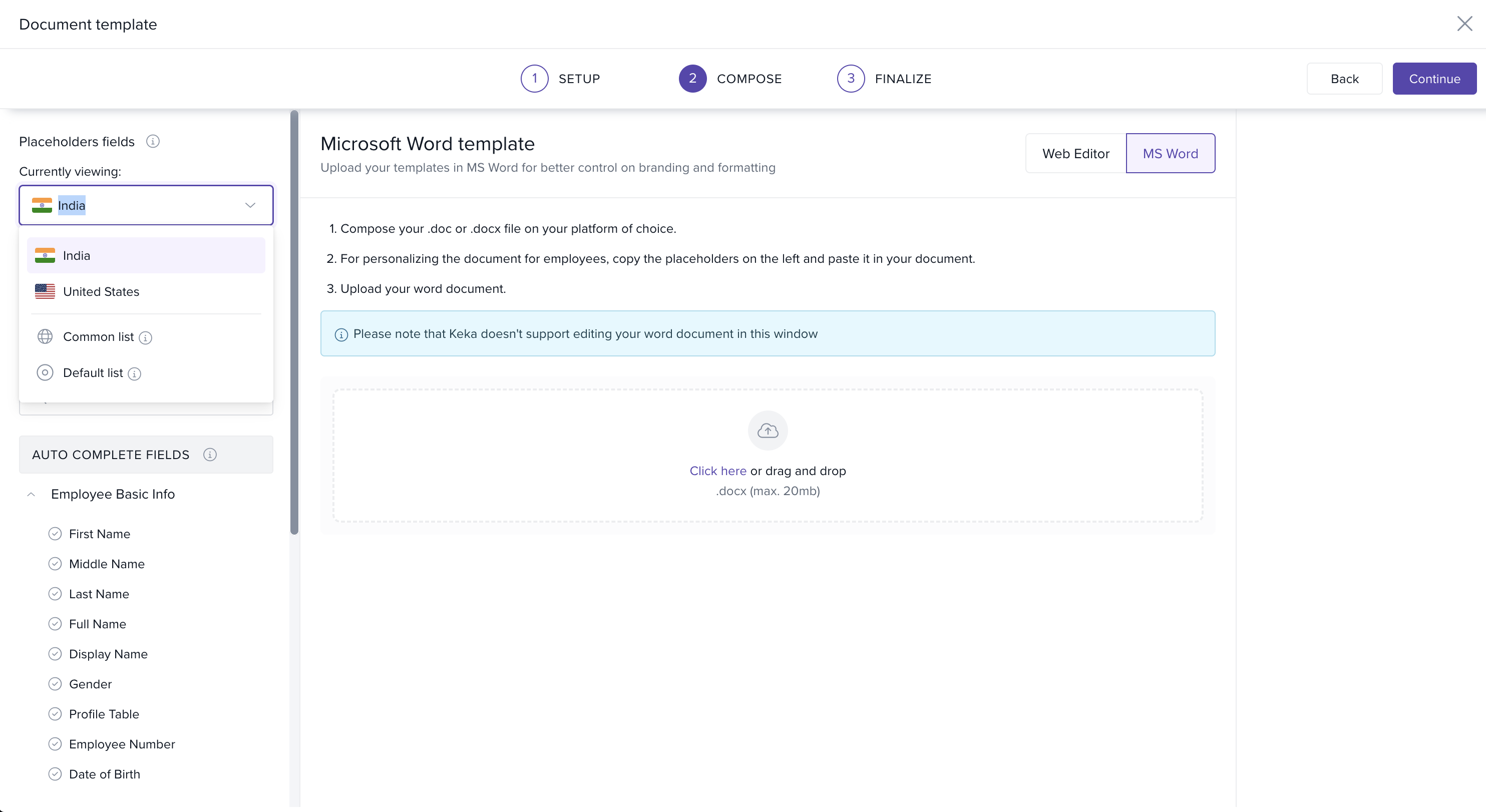
Using the US-Specific Placeholder List
If you're creating documents for US-based employees, simply select "United States" from the placeholder dropdown. This ensures that all placeholders match US-specific requirements, ensuring accuracy in your templates.
Placeholder List Options in Keka
US List: Use this list when creating templates for employees located in the United States. It will ensure that all US-specific fields, such as salary components and tax information, are accurately populated.
Common List: The Common list includes placeholders that are supported across all countries. Use this list for mixed teams, as it ensures consistency regardless of employee location.
Default List: This is the original list of placeholders before country-specific lists were introduced. It serves as a fallback for older templates that were created before the update. If you’re editing an old template, the system will automatically apply the Default list.
How to Fix Placeholder Warnings
If you see a warning that placeholders don't match the employee's country, follow these steps to resolve the issue:
Check the Employee List: Ensure you're selecting employees from the same legal entity the template is intended for. For example, if you’ve used US-specific placeholders, make sure to choose only US-based employees for document generation.
Create a New Template with Common List: If you're managing a mixed team (with employees from different countries), create a new template using the Common list. This will work for all employees, no matter their location.
Clone and Update the Template: If you need a template for non-US employees using the same format, clone the current template, switch the country from the dropdown, and replace the placeholders with those from the appropriate list (e.g., Common or another country-specific list).
Conclusion
This new update in Keka ensures that your document templates are more accurate and region-specific, improving the efficiency and clarity of document generation. By selecting the appropriate placeholder list based on the employee’s country, HR teams can streamline document workflows across different regions.
Comments
0 comments
Please sign in to leave a comment.