Overview
In this guide, you will learn how to:
- Tag project expenses as reimbursable or non-reimbursable
- Configure these tags at the project or invoice level
- Ensure accurate client billing through streamlined expense categorization
- Improve project-level financial tracking and invoicing
Who Can Do This?
- Project Managers
- Finance Teams
- PSA Admins
- Any user with access to project expenses and invoicing permissions
Pre-requisites
- Expenses must be submitted and approved for the project
- Invoice creation rights must be enabled for the user
- The project must be active and linked to a billing model
Step by step instructions
Navigate to the Project
- Log in to the Keka portal.
- Go to Projects from the top menu.
- Click on the desired Project Name.
- Navigate to the Expenses section.
Tag Expenses for Reimbursement
You can tag approved expenses in two ways:
A. At the Project Level
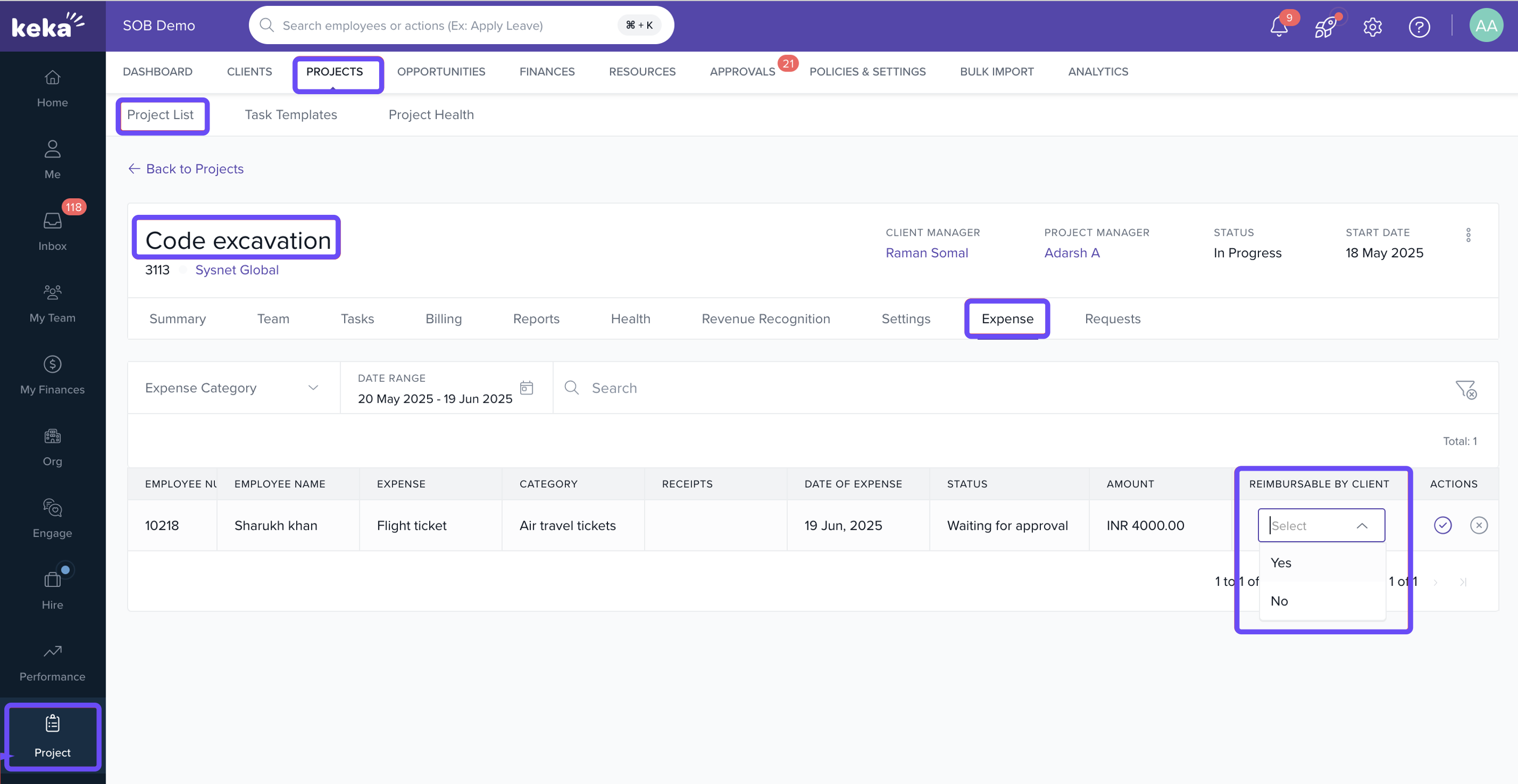
- Open the Expenses tab under the project.
- Review the list of approved expenses.
- For each expense, select either:
- Reimbursable – To include in the client invoice
- Non-Reimbursable – For internal tracking only
- Click Update to save the selection.
B. During Invoice Creation
- Navigate to Invoices > Create Invoice.
- In the invoice generation wizard, all approved expenses for the billing period will be listed.
- Select the reimbursement category for each item:
- Reimbursable or
- Non-Reimbursable
- Proceed with invoice generation as usual.
Finalize and Generate the Invoice
- Review all expense entries before submitting the invoice.
- Ensure only reimbursable expenses are included in the final billing.
- Click Generate Invoice to complete the process.
Notes
- You can link expenses to specific tasks for more granular tracking.
- Expenses once marked as reimbursable cannot be changed after invoice generation.
- Make sure billing period selection matches the expense approval period to avoid missing entries.
How It Connects with Other Modules
| Module | Integration Details |
|---|---|
| Projects | Expenses must be linked to active, billable projects |
| Invoices | Only reimbursable expenses will be pulled into invoice creation |
| Finance | Helps track payable vs non-payable project costs |
FAQs
Q: Can I tag bulk expenses as reimbursable?
A: Currently, tagging must be done one by one during invoice creation or from the project expense list.
Q: What happens if I tag an expense incorrectly?
A: You can re-tag before invoice generation. Once invoiced, the tag becomes locked.
Q: Can I view a breakdown of reimbursable vs non-reimbursable expenses?
A: Yes. Navigate to the Expense Report from the project dashboard.
Troubleshooting
Expense not appearing during invoice creation?
- Check if the expense is approved and falls within the billing period.
Tagging option not available?
- You may not have the required invoice or project permissions.
Comments
0 comments
Please sign in to leave a comment.