In Keka HRMS, holidays in a calendar can be categorized as either Floater or Mandatory. Sometimes you might need to change a holiday’s type—say, mark a floater holiday as mandatory or convert a mandatory one into a floater.
Configuration
1. Navigate to the Holidays section
Go to Time Attend from the left-hand menu.
Click Shifts/Weekly Offs & Holidays.
Select Holidays.
2. Choose the holiday list
Find the Holiday List that includes the holiday you want to update.
Click on the holiday list name to view all holidays under it.
3. Edit the holiday type
Locate the specific holiday you want to modify.
Click the Edit icon (pencil) next to that holiday.
In the edit view, toggle the switch to mark the holiday as either:
Floater
Mandatory
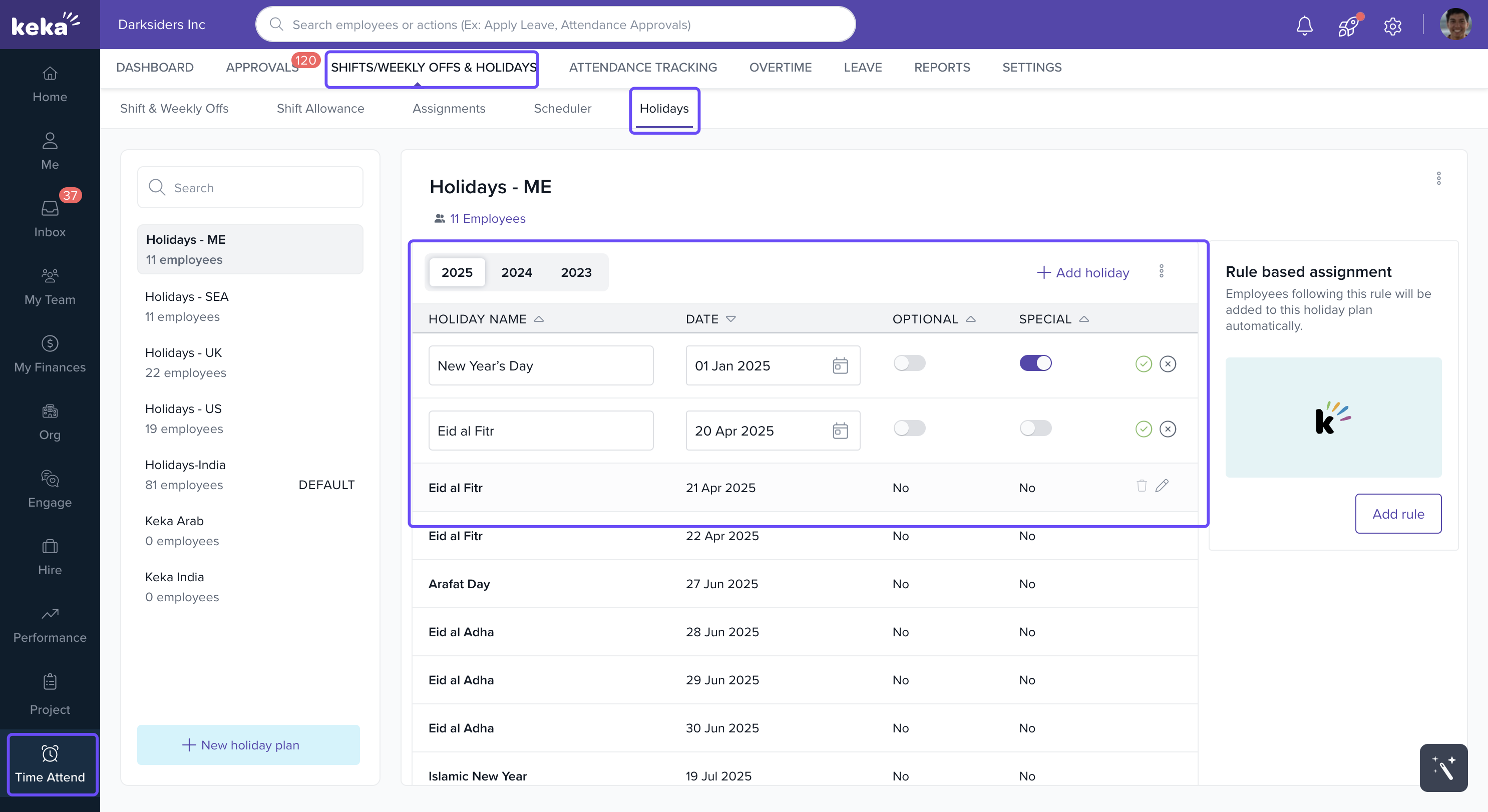
Click Save to apply your changes.
Tip: You can change the holiday type anytime based on company policies or operational needs.
Comments
0 comments
Please sign in to leave a comment.