To know how to create Encashment policy check out our video here
To use the Leave Encashment policy during YEP in Keka, follow these steps:
Set up Leave Encashment Formula:
Before running YEP, ensure that your Leave Encashment formula is configured in the Payroll section. This formula determines how the encashment amount is calculated for employees based on their leave balance and salary.
Step 1 — Review Eligible Employees:
When you start YEP, Keka will display all employees who are eligible for leave encashment based on the formula you’ve defined. This list will automatically populate in the YEP processing flow.
Step 2 — Adjust Leave Encashment:
Although Keka auto-calculates the encashment amount for each employee, you can manually edit the number of days to be encashed or the encashment amount if needed. This gives you the flexibility to adjust the encashment based on your organization’s policies or individual employee cases.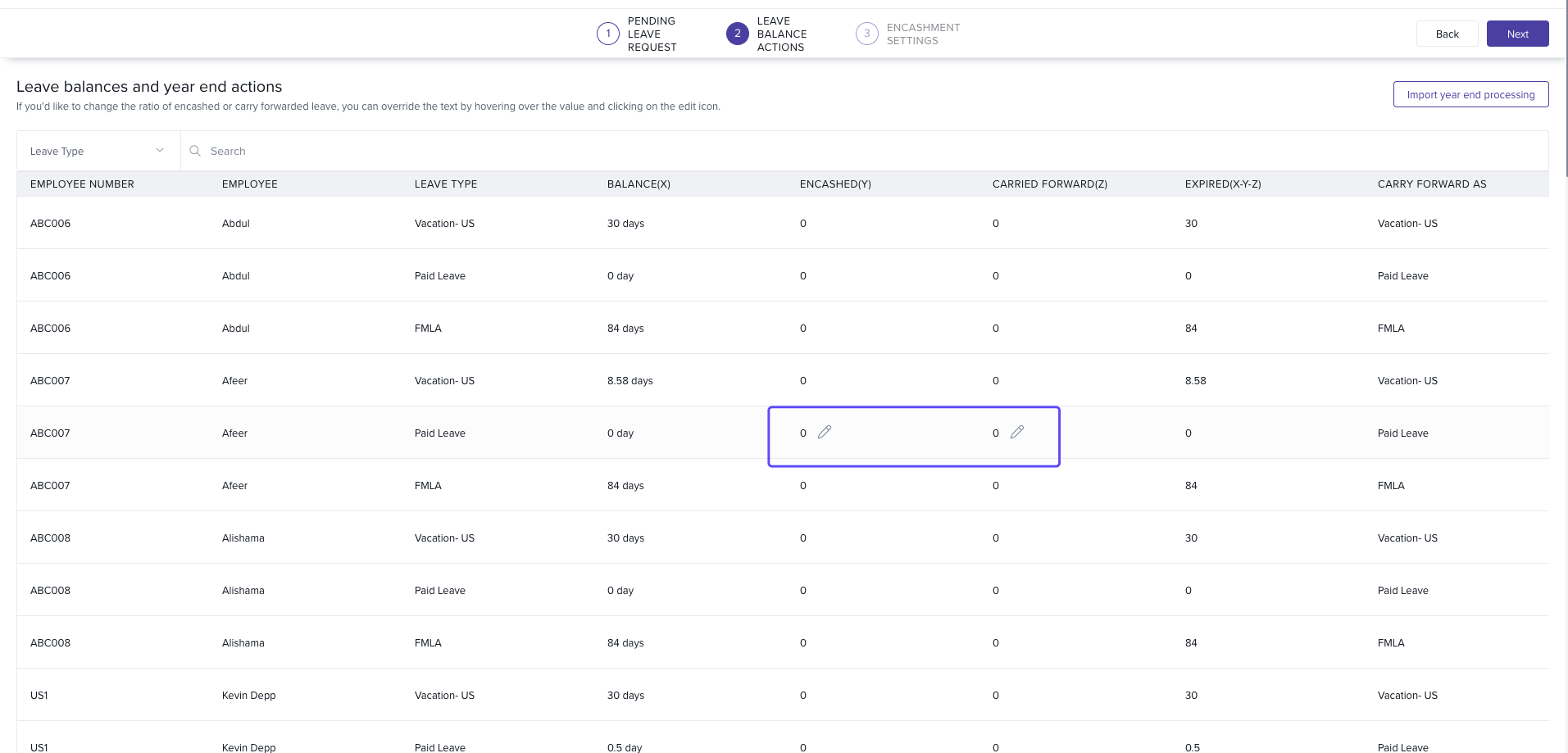
Step 3 — Select Encashment Policy:
In the third step of YEP, you can select which Leave Encashment policy to apply for each employee. Keka will display all the policies you’ve created under the Leave Encashment section in Payroll. Select the appropriate policy for each employee based on their eligibility and entitlements.
Step 4 — Edit Amount and Select Payout Month:
You can also edit the encashment amount if necessary and choose when the encashment will be paid out. Based on your Leave Calendar year, you will see the current month and the next three months as available options for payout. Select the month that aligns with your payroll timeline.
Comments
0 comments
Please sign in to leave a comment.