Introduction
Keka's payroll system offers flexibility to manage various salary components, including ad-hoc deductions such as overtime (OT), shift allowances, and custom components tailored to your organization's needs. This guide will walk you through how to add these components and manage them using Keka's user interface and API.
Add Ad-Hoc Deductions (OT & Shift Allowance)
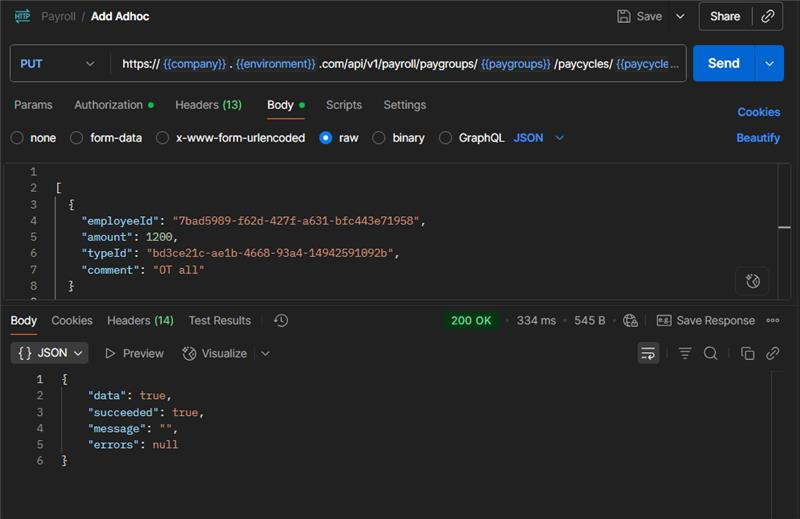
1. Fetch Salary Component Type (TypeID)
To begin, you’ll need to identify the correct component type before adding any salary components. This can be done by fetching a list of all salary components through the Get all Salary Components API.
The response will provide a list of salary components such as OT (Overtime) and Shift Allowance. Each component has a unique id and type, such as "Deduction" or "Allowance."
2. Retrieve Employee Information
Once you've identified the relevant components, you’ll need to gather employee details to associate the ad-hoc deductions or allowances with the appropriate employees. You can fetch this data via the Get all Employees API.
This API provides a list of all employees, allowing you to identify the right ones to apply the deductions or allowances.
3. Retrieve Paygroup Information
If the ad-hoc deduction or salary component needs to be allocated to a specific pay group, you can use the Get all Pay Groups API to retrieve a list of available pay groups within your organization.
This will help you assign ad-hoc deductions to the correct pay group.
To begin, you may want to fetch the list of existing PayCycles before adding new ones. This can be done using the PayCycles API.
We trust this article provides the guidance you need.
Comments
0 comments
Please sign in to leave a comment.