Overview
The embedded tax-filing flow lets you start your Income-tax return directly from Keka. With one click, your Form 16 is securely pushed to Quicko- Keka’s preferred filing partner- so you can complete your return in minutes.
Who can do this
- All employees whose payroll is processed in Keka and who have a generated Form 16 in the current financial year.
- HR/Payroll admins can promote the feature using Keka annoucements or emails but cannot file on behalf of employees.
Pre-requisites
- Your Form 16 is available under My finances → Forms.
- Pop-ups are allowed in your browser for Keka and Quicko.
- You have an active Quicko account (created automatically during the first redirect).
Form 16 is split into multiple parts (Part A & Part B), both will be sent to Quicko.
Step-by-step instructions
1. Go to the My Finances section in your Keka account. In the Manage Tax tab, select Tax Filing. Find the banner labeled "Install and File Now" next to Quicko, and click it.
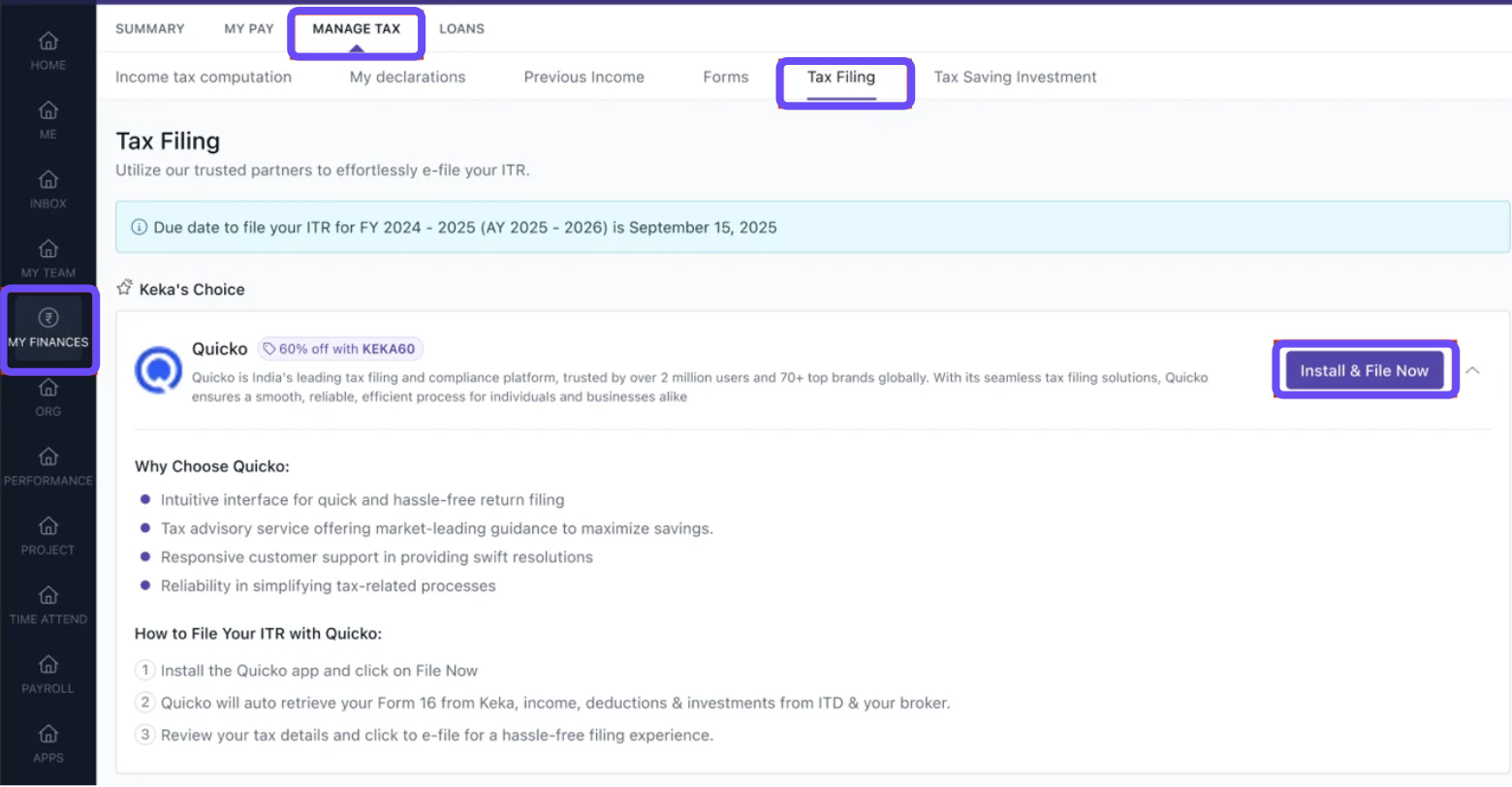
2. Approve access when prompted to install the Quicko app
3. You'll be securely redirected to Quicko's platform
4. Quicko automatically reads your Form 16 from Keka
5. Proceed with filing your return on Quicko
Return filing is complete only after you e-verify on the ITD portal (OTP, Aadhaar, net-banking, etc.).
Compliance and data security
- Form 16 is shared with Quicko via a secure, encrypted API.
- No payroll data beyond Form 16 is transmitted.
- You can revoke Quicko’s access anytime under Me→Apps.
How it connects with other modules
- Payroll – Uses the same Form 16 generated during payroll processing.
- Expense management – No impact on reimbursements or tax-savings declarations.
- Employee documents – Your filed ITR-V can be uploaded back to Documents for safekeeping.
FAQs
1. Can I edit Form 16 values in Quicko?
Ans. Yes, Quicko lets you adjust numbers before final submission.
2. Can I see the Tax Filing status in Keka?
Ans. No, tax filing status will be visible on the income tax department e-port
3. What happens if I uninstall the Quicko app?
Ans. Quicko loses access to your Form 16; you can reinstall anytime.
Troubleshooting tips
- Install button missing – Clear browser cache or use an incognito window.
-
Redirect fails – Allow third-party cookies or disable strict ad-blockers.
Comments
0 comments
Please sign in to leave a comment.