Before You Begin, Please Note:
- The Attendance API Key is different from your Keka Portal API Key. Please do not use your portal API credentials for this setup.
- The customer must share the following details with their assigned Customer Success Manager (CSM) or Keka Support team to initiate the setup:
- Number of devices or apps used to store/push attendance data:
- Device Name – This name will be shown under the employee profile → Time → Attendance Logs
- Location to be mapped
- For Apps: Use Location – All (Here we shall map the API device to anyone location, but it will be applicable for all) :
- For Biometric API Devices: Please mention specific location
- IN/OUT Type – Whether this device or app captures IN only, OUT only, or both IN & OUT
- Once the above details are provided, the CSM/Support POC will coordinate with Keka's Engineering team to:
- Establish a connection with the device/app by adding the device in the backend:
- Share the Attendance API Key, Device Identifier, and the Base URL
- Please ensure that your subscription includes the API Add-on, as it is mandatory for enabling this integration.
TABLE OF CONTENTS
Welcome to the Attendance Log Ingestion API guide. The document provides comprehensive instructions on how to correctly use Keka's Attendance API's base URL, headers, body, and comprehend the responses it produces.
Base URL
The API uses a POST call, accessible at the following URL:
https://[assigned_server].a.keka.com/v1/logs
Please note that the [assigned_server] in the URL will be provided by KEKA's support team, depending on your country of operation and the server assigned to you. Kindly reach out to the support team to get this detail before initiating the API integration process. Commonly used values will be cin01, cin02 if your business is located in India.
API Headers
For successful API calls, you need to include the following headers:
Content-Type : 'application/json'X-API-Key : '_X-API-Key_'- Content-type must be set as application/json.
- X-API-Key will be issued by the KEKA support team when you raise a development request for the Attendance Log Ingestion API.
- Content-TypeX-API-Key
API Body
The API body carries the employee log data in a JSON format. Here's the expected format:
[{

"DeviceIdentifier": "__DeviceIdentifier__",

"EmployeeAttendanceNumber": "__AttendanceNumber__",

"Timestamp": "__Timestamp__",

"Status": 0

}]
- DeviceIdentifier is provided by the KEKA support team, along with the X-API-Key, upon raising a request for the Attendance Log Ingestion API.
- EmployeeAttendanceNumber is the unique attendance number of each employee, as registered on the KEKA portal.
- Timestamp denotes the specific time when the employee checked IN/OUT on a particular day. Accepted-Timestamp format is
YYYY-MM-DDTHH:MM:SS - Status represents the type of the punch recorded at that specific moment. Here, "0" represents an IN punch, while "1" represents an OUT punch.
Sample API Body
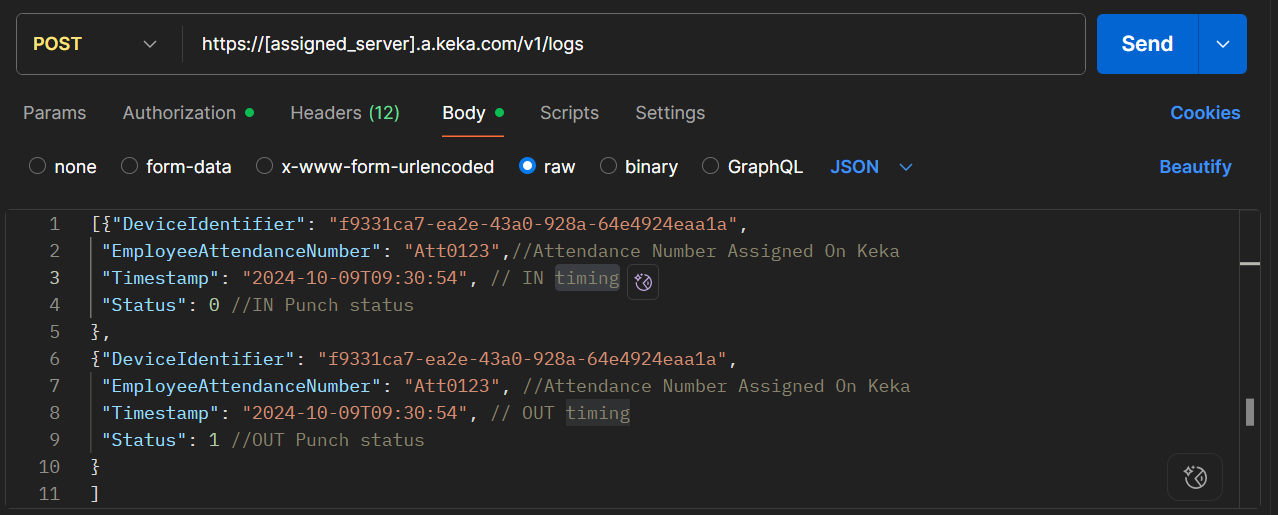
Response Message
Upon successful execution of the API call, the following response is returned:
{

"data":

{

"logsReceived": 1,

"logsAccepted": 1, },

"succeeded": true

}


In case of a failed API call, the following response is generated.

{

"errors": [

"Error message" ],

"succeeded": false

}
- data is an object included in the response when the API call is successful. It contains details about the number of logs posted (
logsReceived) and the number of logs accepted and saved in the KEKA server (logsAccepted). - succeeded is a Boolean value indicating whether the API request was successful.
-
errors is an array object returned when the API call fails. It includes a list of errors that led to the failure of the API request.
Other Frequently Asked Questions:
1. How many logs can we push in a single API request?
You can push a maximum of 1000 logs in a single API request.
2. Can we push past dated logs in the API request?
Yes, past-dated logs can be included in the API request. The Log Ingestion API permits the inclusion of logs from the previous 30 days.
3. What if the X-API-Key provided by KEKA is misplaced or stolen?
In such scenarios, please contact the KEKA support team immediately. They will disable the previous key and issue a new API Key.
4. Can we add more devices to the Log Ingestion API?
Yes, to add more devices, please reach out to the KEKA support team.
5. Why are my logs not reflecting?
Possible reasons:
a) Incorrect Attendance number
b) Attendance Number not assigned
c) Pushing more than past 30 days of data (check point 2)
d) Incorrect Base URL or API key
e) Different API key (check point 4)
6. Where is my API key for Attendance purpose?
The Attendance API Key is different from your Keka Portal API Key. Please do not use your portal API credentials for this setup. This Attendance API key is shared
7. Process of getting device identifier and API key for Pushing Attendance
If you have API add-on, please reach out to your CSM/support POC with the following information:
Keka Support team to initiate the setup:
- Number of devices or apps used to store/push attendance data:
- Device Name – This name will be shown under the employee profile → Time → Attendance Logs
- Location to be mapped
- For Apps: Use Location – All (Here we shall map the API device to anyone location, but it will be applicable for all) :
- For Biometric API Devices: Please mention specific location
- IN/OUT Type – Whether this device or app captures IN only, OUT only, or both IN & OUT
Engineering team will be sharing them the details and the same will be shared to you.
8. Who will do this integration?
Keka is the party exposing its API and therefore we will share you the device identifier and Attendance API key, please ask the vendor to push the data
9. Can I push API logs just for limited set of employees?
Yes, suppose you have 60/100 employees on a different App for whom you want to push the data. Just make sure:
a)Their Attendance Numbers are correctly added in Keka
b)Your vendor pushes logs only for those employees
Example:
If Employee A (Attendance No: Ce01) is using an App, and Employee B (Ce02) is using a biometric device,
please ask your vendor to only push logs for Ce01.
If they push logs for Ce02, Keka will still accept and record them.
10. Can I only push first IN and last out?
Yes. You can push either: Only the first IN and last OUT logs, or all logs throughout the day. Keka will accept whatever you send - the choice is yours.
Do let us know if you find this article helpful.
Comments
0 comments
Please sign in to leave a comment.