Introduction
Keka’s Helpdesk API provides a convenient and efficient method for managing support tickets and categories, helping your team optimize ticket handling. With this API, you can easily retrieve helpdesk categories, create new tickets, and get a complete list of existing tickets.
Using the Helpdesk APIs
1. Retrieve Helpdesk Categories
Before managing tickets, you'll want to fetch the available helpdesk categories. The Get All Helpdesk Categories endpoint helps you do just that.
Sample curl is present on the url itself
Sample JSON Response:
2. Create a New Helpdesk Ticket
After selecting the appropriate category, you can create a new ticket. The data you send in the request body will vary based on the category chosen.
Add Helpdesk Ticket
This step enables you to add a ticket based on the selected category and other relevant parameters, like priority and assignee.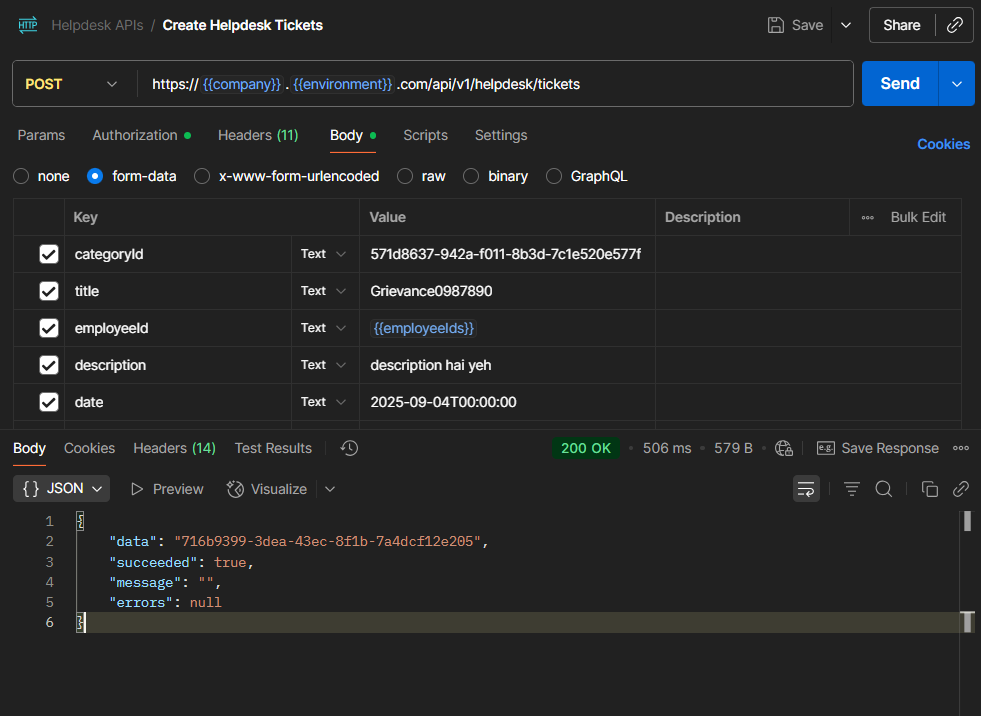
3. Retrieve All Helpdesk Tickets
If you need to get a list of all the tickets in your system, you can use the Get All Helpdesk Tickets endpoint. This will return tickets across all categories.
With this API call, you’ll get a comprehensive list of all tickets, whether they’re open, closed, or pending resolution.
We trust this article provides the guidance you need.
Comments
0 comments
Please sign in to leave a comment.