Introduction
This guide walks you through the full process of submitting an expense claim using the Expense Claims API.
You’ll learn how to:
Fetch available expense categories
Add expenses under specific categories
Submit those expenses as a claim
This article is intended for users with API access and valid permissions under the Expense module.
Prerequisites
Make sure the following are in place before you begin:
A valid API authentication token
Expense categories already set up in your system
Expenses raised before initiating a claim
Steps
1. Get All Expense Categories
To start, retrieve the list of available expense categories.
Call the Get all Expense Categories API.
The response will include all categories along with their IDs.
You’ll need the category ID to add an expense in the next step.
Sample JSON response
2. Add an Expense
Once you have a category ID, you can add a new expense.
Prepare the request body with relevant fields for the selected category.
Note that required fields may vary by category.
Use the Adds an Expense claim to create the expense.
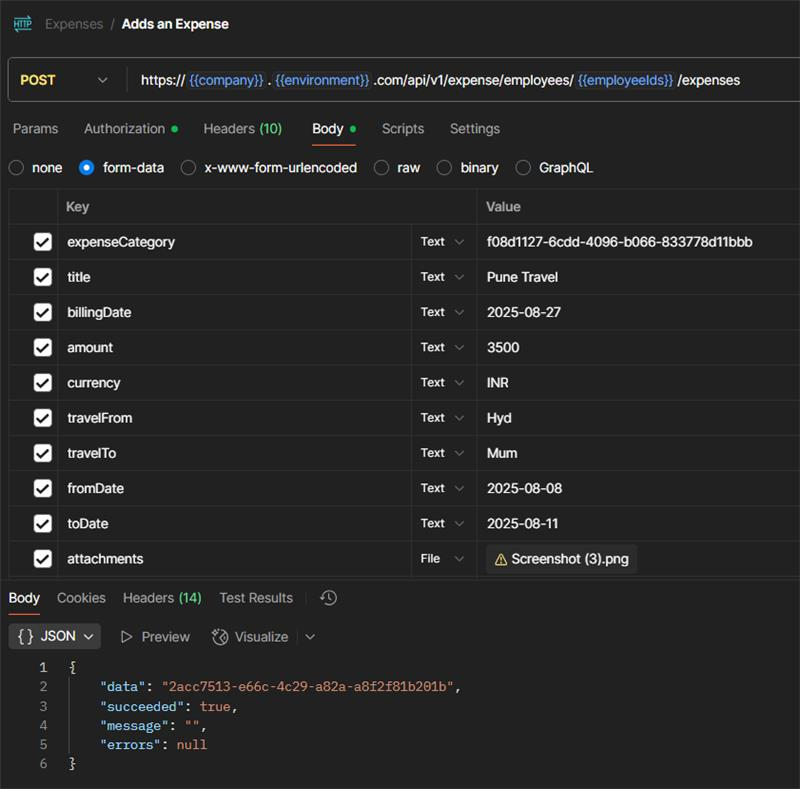
Sample CURL request for Adding expense
3. Submit Expense Claim
a) Get All Expenses
Before submitting a claim, identify the expenses you want to include.
Call the Get all Expenses API.
Note the expense IDs from the response.
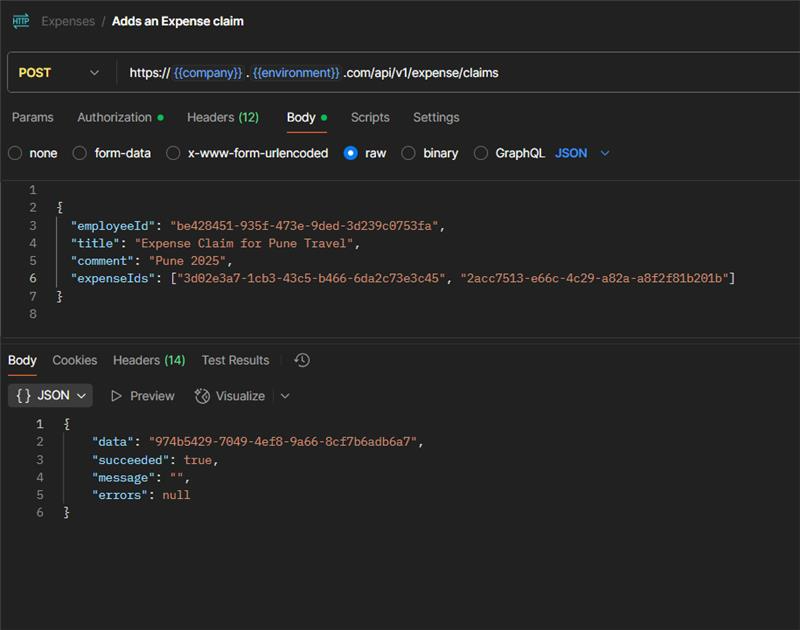
Now that you have the expense IDs:
Use the Submit Expense Claim API.
Provide the list of expense IDs along with claim metadata like date and remarks.
Options & Variants
-
Category-specific fields: Each expense category may require different fields. For example:
Travel might require location and date
Meals might require bill attachment or vendor details
Field Reference / Parameters
| Field Name | Description | Required | Example |
|---|---|---|---|
| categoryId | ID of the expense category | Yes | "101" |
| amount | Amount spent | Yes | 2500 |
| currency | Currency code (ISO format) | Yes | "INR" |
| date | Date of expense | Yes | "2025-09-01" |
| description | Description of the expense | Optional | "Taxi fare" |
| expenseIds | List of expenses to include in claim | Yes | ["5001", "5002"] |
| claimDate | Date the claim is submitted | Yes | "2025-09-02" |
| remarks | Notes about the claim | Optional | "Business trip" |
Notes, Tips, Important, Warnings
- Tip: Always cross check the fields for the particular expense Category ID. The Category fields will vary from each category to category. For example, the fields for Accommodation expense category will vary from a Flight category.
- Important: Claims cannot be submitted unless expenses have already been added.
- Warning: Mismatched or invalid category IDs will cause the request to fail.
Examples & Use Cases
Use Case 1: Submit a single-day trip expense with travel and meal charges.
Use Case 2: Automate monthly employee reimbursements via scheduled API calls.
Use Case 3: Build an internal dashboard to track expenses and claims in real-time.
You can pull all submitted expense claims using:
Get all Expense Claims
We trust this article provides the guidance you need.
Comments
0 comments
Please sign in to leave a comment.