The Preboarding Page in Keka is an essential part of the onboarding process. It provides a centralized, efficient way to manage job offers, track candidate progress, and ensure a smooth transition from offer release to joining.
This guide walks you through the features, functions, and best practices for using the Preboarding page effectively.
Accessing the Preboarding Page
Navigate to Org → Onboarding in the main menu.
Click the Preboarding tab.
Understanding the Preboarding Dashboard
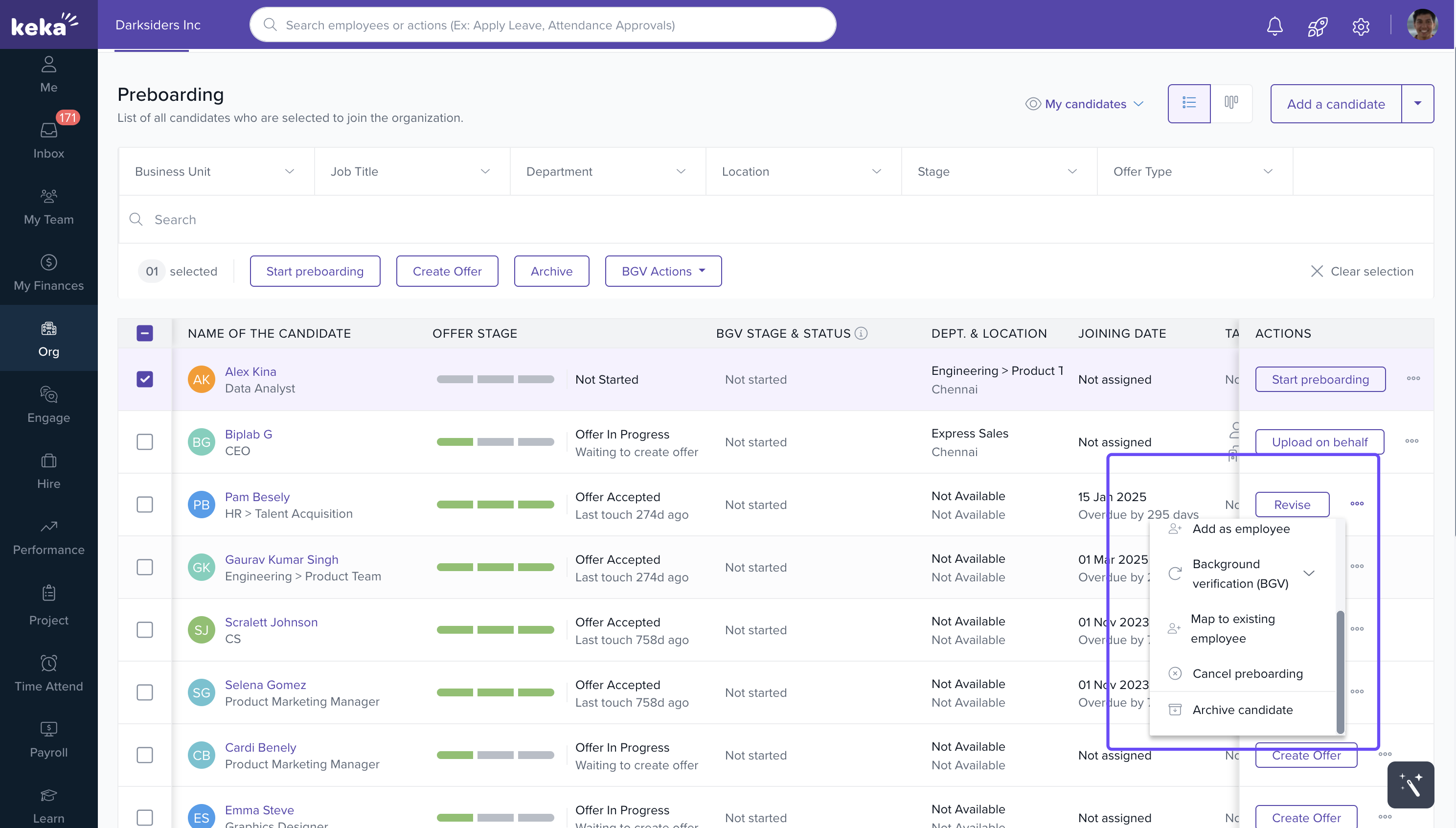
The Preboarding Dashboard gives a complete overview of all candidates who have been offered positions. Key elements include:
Filtering Options (1):
Filter offers by Job Title, Department, Location, Stage, or Offer Type to narrow your view.Offer Stage (2):
Displays each candidate’s name, offer stage (e.g., Offer Released, In Progress), department, location, joining date, and pending onboarding tasks.Tasks Pending (3):
Shows if any preboarding tasks—such as document submissions or background checks—are pending for each candidate.Actions (4):
Quick-access functions like:Remind Candidate – Send reminders to take pending actions.
Create Offer – Begin the offer creation process.
Archiving (5):
Archive inactive offers to maintain a clean, focused dashboard.
Managing Individual Offers
Click the Actions button next to a candidate’s name to perform key actions:
Revise Offer: Edit offer details such as role, compensation, or start date.
Send Reminder: Notify candidates who haven’t responded.
Change Tasks: Assign or update onboarding tasks.
Revoke Offer: Mark an offer as revoked if it’s withdrawn.
Add as Employee: Convert a candidate directly into an employee record.
Release Offer: Send the offer for approval or release it after approval delays.
Archive Candidate: Archive candidates who are no longer in the process.
Creating and Sending a New Offer
Click Add a Candidate to create a new offer.
Enter required details like personal information, job title, and compensation.
Once the offer details are ready:
Preview Offer: Review and make edits as needed.
Send Offer: Send the offer letter directly via email.
Track Status: The sent offer will appear in the dashboard for monitoring responses and task progress.
Streamlining the Process with Bulk Actions
For managing multiple candidates efficiently, use Bulk Actions such as:
Sending reminders to several candidates at once.
Revoking multiple offers simultaneously.
Tip: Bulk actions help HR teams save time while maintaining accuracy and consistency across onboarding activities.
The Preboarding Page in Keka is a powerful tool that bridges recruitment and onboarding. It centralizes offer management, automates candidate communication, and provides complete visibility into onboarding progress.
By leveraging these features, HR teams can ensure a smooth, efficient, and professional preboarding experience for every new hire.
Comments
0 comments
Please sign in to leave a comment.