Introduction
Welcoming new hires is a crucial step in building a productive and engaged workforce. Keka HR’s redesigned Preboarding experience simplifies this phase with flexible, automated flows tailored for HR professionals and candidates alike. This update is a complete revamp—driven by user feedback—to offer a more intuitive, customizable, and efficient way to manage Preboarding.
Preboarding flow
The Preboarding process now gives organizations greater control and adaptability. You can initiate activities like document collection, offer letter acceptance, and even employee creation right from the new flow—no rigid sequences required. This flexibility ensures that each organization can define its own path from offer to onboarding.
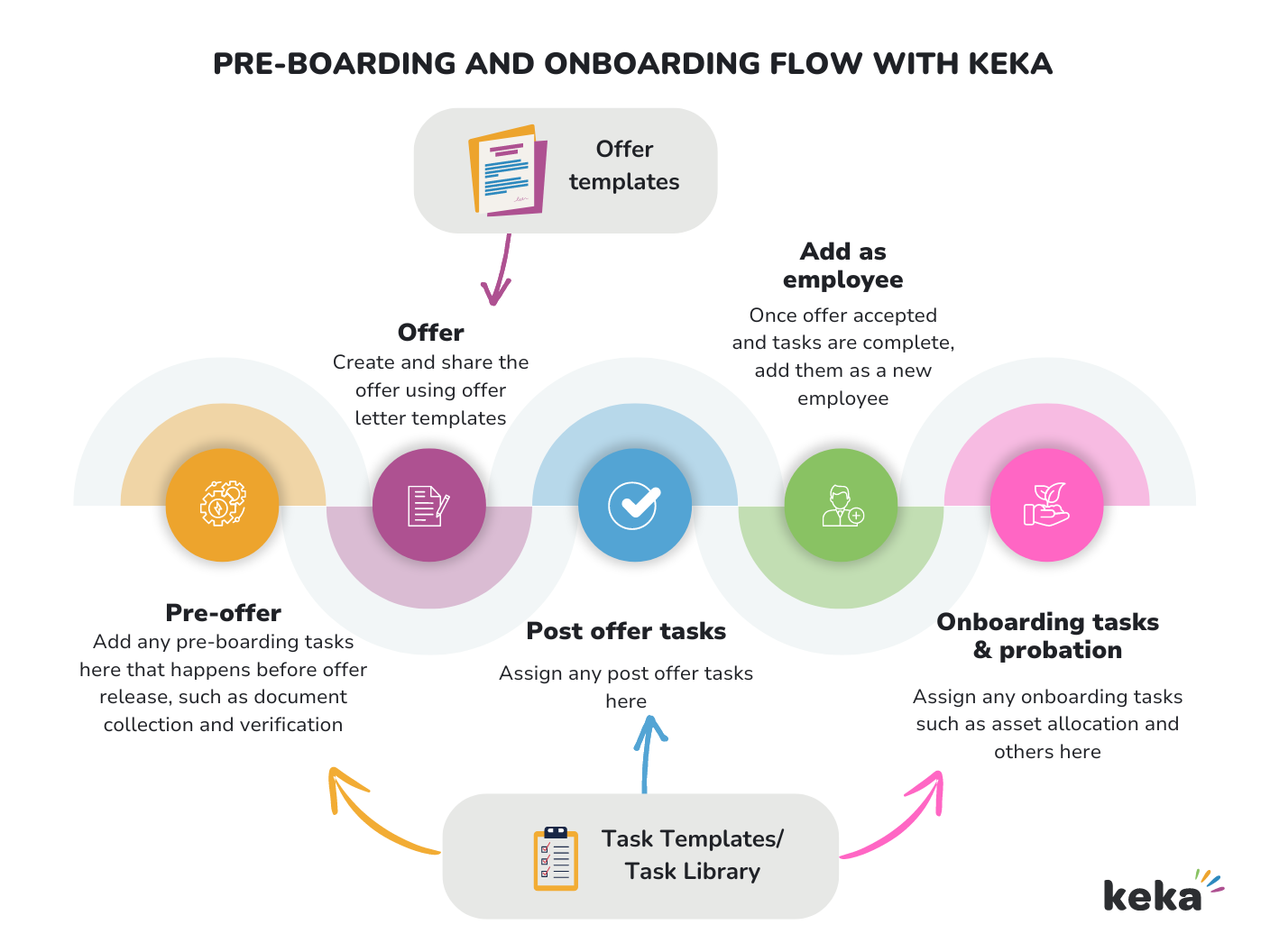
Streamlined Transition from Preboarding to Onboarding
We’ve transitioned the Preboarding module from Keka Hire into the Keka HR portal, creating a more seamless experience. This update makes it easier for HR teams to manage candidate information, initiate onboarding tasks, and keep new hires engaged without switching systems.
Flexible Flows and Enhanced Customization
Forget one-size-fits-all workflows. You can now:
Issue offer letters
Collect essential documents
Add new hires directly as employees
...all in any order that suits your organization’s process. This non-linear approach supports complex hiring scenarios and varied onboarding needs.
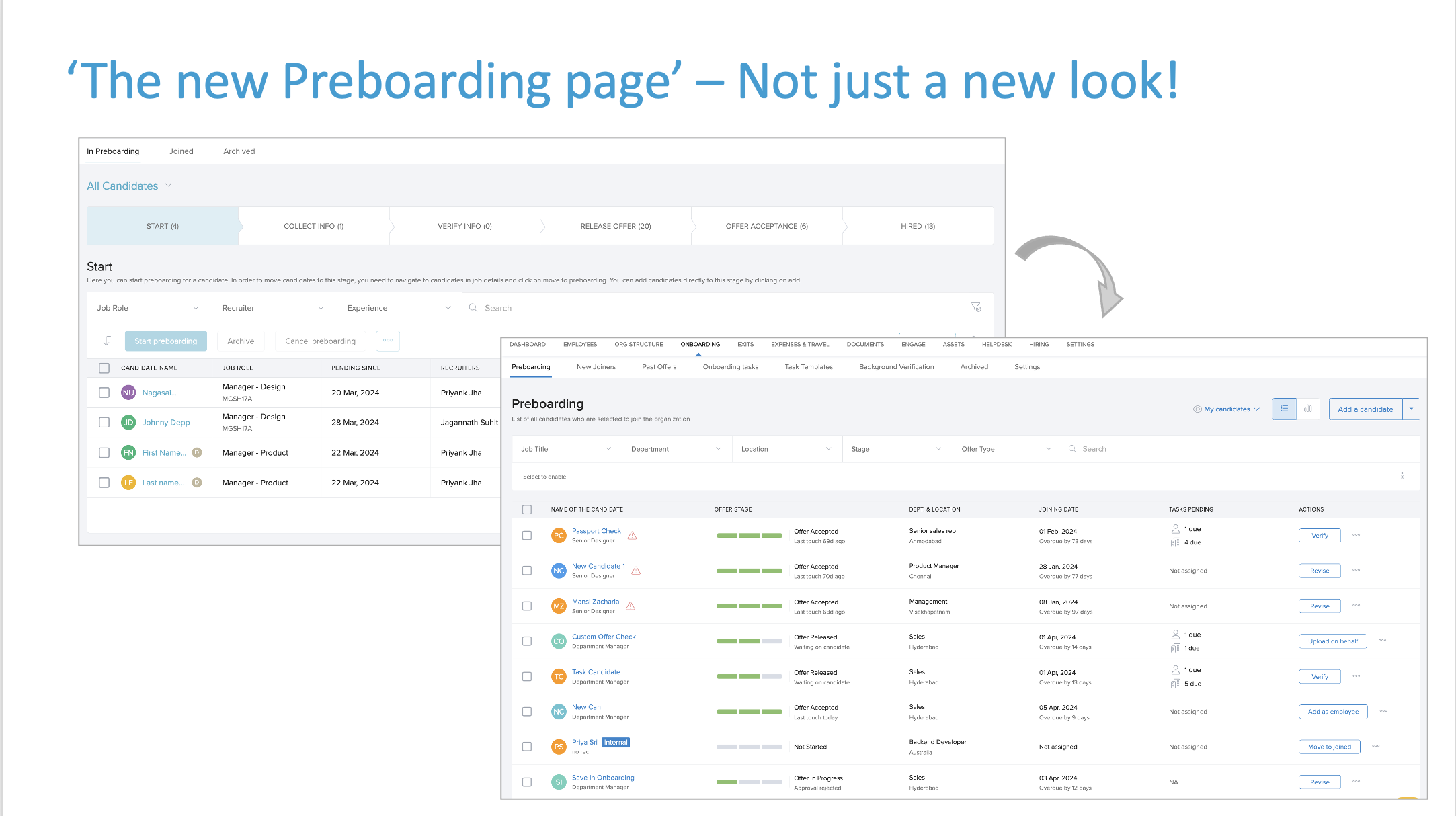
The New Preboarding Page – More than a Facelift
The redesigned Preboarding page offers:
At-a-glance visibility: See pending tasks assigned to both candidates and internal stakeholders.
Progress tracking: Use the three-bar icon to quickly check where a candidate stands in their preboarding journey.
Centralized actions: The new action menu brings all candidate-specific actions into one place, allowing HR teams to adapt as needed.
Task Enhancements
Tasks are no longer limited to the Onboarding phase—they’re now part of Preboarding too. This change allows HR teams to assign responsibilities earlier in the process and automate task workflows before Day 1. With more configuration options and precise controls, task assignment is now dynamic and aligned with organizational roles and timelines.
Task Template Revolution
We’ve replaced outdated concepts like Task Lists and Onboarding Groups with a smarter solution—"Applies To" criteria in task templates.
Now, tasks can be automatically triggered based on:
Department
Location
Worker type
This means tasks are only assigned when they’re truly relevant, minimizing unnecessary notifications and maximizing efficiency.
New Dashboards for HR and Candidates
New Joiners Dashboard: HR teams can now track upcoming joiners in real time. This view helps plan Day-1 activities, allocate resources, and ensure nothing slips through the cracks.
Onboarding Tasks Dashboard: This dashboard offers a candidate-centric view of progress. HR professionals can monitor each task’s status, spot delays, and step in when needed.
Revamped Candidate Experience Portal: Candidates now have a unified portal where they can:
View and accept offer letters
Complete assigned tasks
Receive welcome messages and content tailored to your brand
This creates a warm, personalized introduction to your organization from the moment a candidate accepts the offer.
For more, read our full guide on the Candidate Experience Portal
Getting the Most Out of the New System
To make the most of Keka’s enhanced preboarding experience:
Set up your core assets: Create offer letter templates, preboarding tasks, and HR policies.
Use automation: Leverage "Applies To" criteria and task triggers to reduce manual intervention.
Personalize the candidate portal: Customize welcome messages and content to reflect your company culture.
Keka’s new Preboarding workflow reflects our commitment to continuous innovation and customer-led improvements. With these changes, we’re helping you build a smooth, engaging, and tailored onboarding journey from day one.
Thank you for choosing Keka HR.
For background check setup, see our article on Background verification for Preboarding Candidates.
Comments
0 comments
Please sign in to leave a comment.