Overview
Internal notes and feedback in Keka are essential tools that help your organisation foster transparency, enhance performance tracking, and support continuous growth. These features are designed to promote open communication between managers and employees, forming the backbone of a healthy performance culture.
This article explains how managers and employees can effectively use internal notes and feedback, and how to configure settings to align with your organisation's goals. Follow these steps:
Using Internal Notes as a Manager
Managers can use internal notes to:
Record key interactions, performance observations, and development goals for team members.
Track progress and document support provided to employees over time.
Refer back to these notes during performance reviews and development discussions.
Please refer to the following articles to add and view internal notes : Add Internal notes & View Internal Notes.
Understanding Internal Notes as an Employee
Employees do not have direct access to internal notes.
-
However, these notes often form the basis of performance discussions, giving employees clarity on their strengths and areas for development. Insights from internal notes can help employees:
- Documented notes can guide employees in creating a targeted approach to their professional growth, as discussions around these notes can lead to actionable development plans.
Align better with development plans and career goals.
Using Feedback to Support Performance
Keka’s feedback feature provides a structured way to share feedback across the organisation.
Encourages constructive conversations in a supportive environment.
Helps reinforce positive behaviours and recognise employee achievements.
Drives engagement by making feedback part of everyday interactions.
Please go through this article to know more about giving feedback to employee: Give feedback to an employee.
Setting Up Internal Notes and Feedback
To enable and manage internal notes and feedback settings:
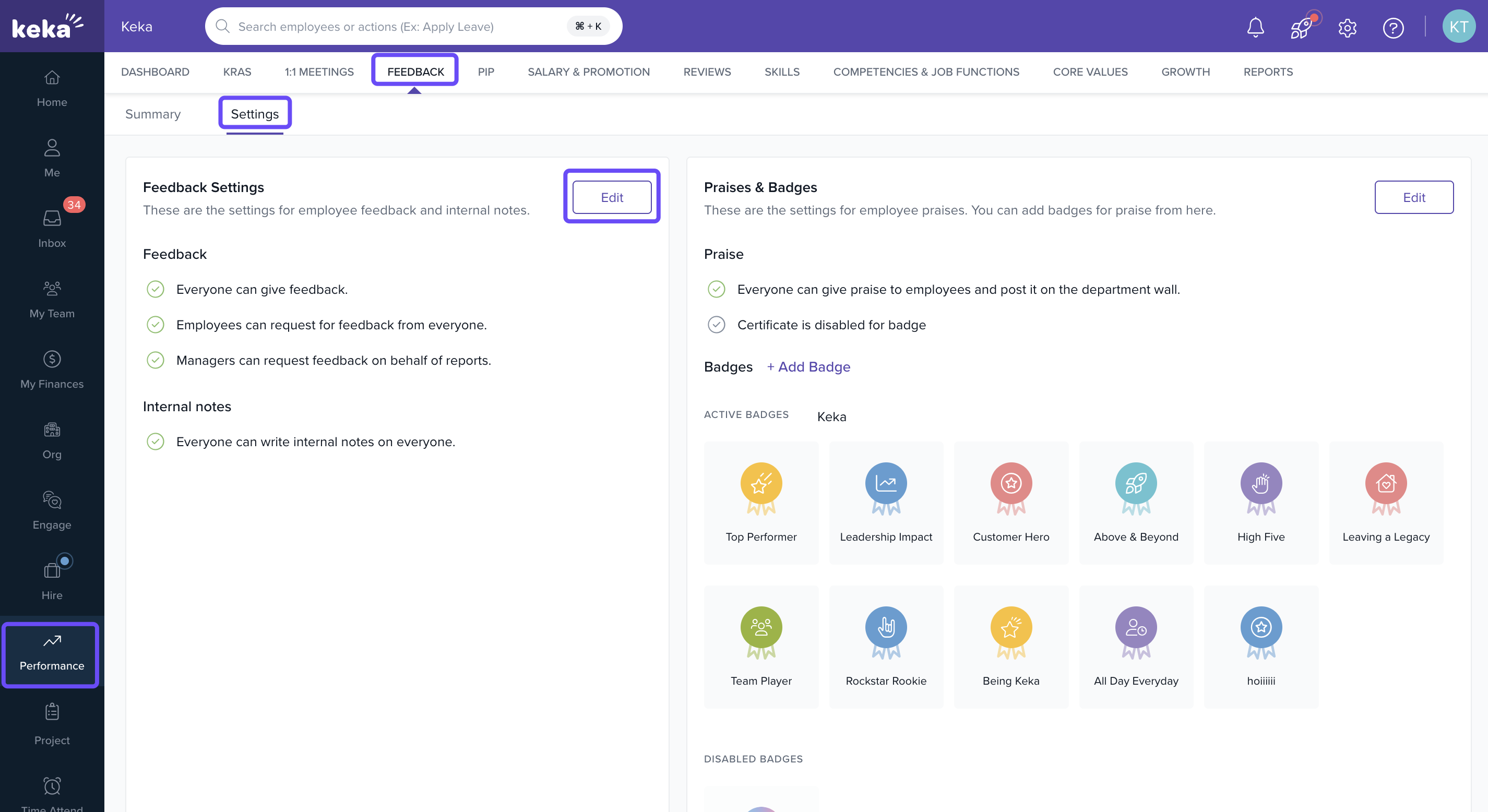
Go to the Performance section.
Click on the Continuous Feedback tab.
Select Settings.
-
In the Feedback section, click Edit.
-
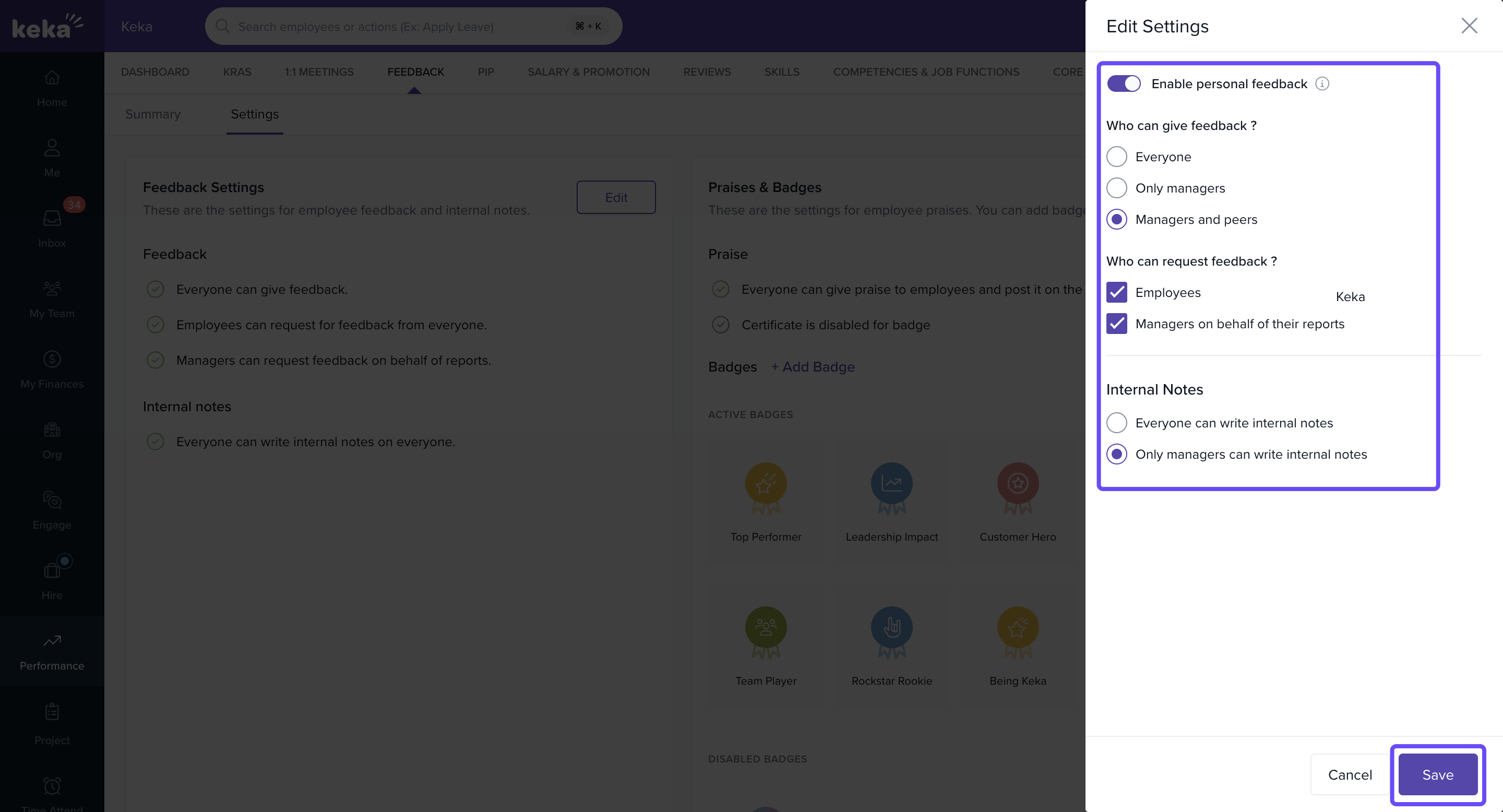
Configure the following options:
5.1 Enable/Disable Personal Feedback
Turn this on or off.
Note: If disabled, all existing personal feedback will be hidden.
5.2 Feedback Providers – Choose who can give feedback:
Everyone
Only Managers
Managers and Peers
5.3 Feedback Request Permissions – Choose who can request feedback:
Employees
Managers (on behalf of their team members)
Both
5.4 Internal Notes Accessibility – Decide who can write internal notes:
Everyone
Managers only
Options & Variants
Visibility of Internal Notes: Internal notes are not visible to employees but are accessible to those permitted via the settings.
Historical Feedback Visibility: Turning off personal feedback will hide all past feedback. You can re-enable it later to restore visibility.
Notes, Tips, Important, Warnings
Note: Internal notes are for internal use only and are not visible to the employees they are about.
Important: Disabling feedback removes access to historical entries unless re-enabled.
Examples & Use Cases
A manager uses internal notes to document a coaching session and later refers to it during a performance review.
An employee receives feedback from a peer, which is used to craft a development plan in collaboration with their manager.
FAQs
-
Can employees see internal notes?
No. Internal notes are for manager or admin reference only. -
What happens to existing feedback if I disable the feature?
It becomes hidden, but not deleted. Re-enabling the setting will restore visibility. -
Who can give feedback by default?
By default, feedback permissions depend on how you configure the Feedback Providers setting.
Internal notes and feedback in Keka are more than just documentation tools—they're key to building a transparent, performance-driven culture. By setting up these features thoughtfully, managers can better support their teams, and employees can benefit from clearer, more actionable development paths. When used consistently, these tools empower everyone in your organisation to grow with purpose.
Comments
0 comments
Please sign in to leave a comment.