Introduction
To make effective hiring decisions, it’s important to align your hiring structure with your organization’s departments and locations. Keka Hire makes this easy by letting you sync your departments and locations directly from your main Keka portal.
You don’t need to add departments separately in Keka Hire—just sync once and keep everything up to date.
Syncing Your Organization’s Departments and Locations
Access your organization settings
Go to Settings → Organization in Keka Hire.
You’ll see two tabs: Departments and Locations.
Sync from Keka portal
In each tab, click the click here button to sync your departments or locations from the Keka portal.
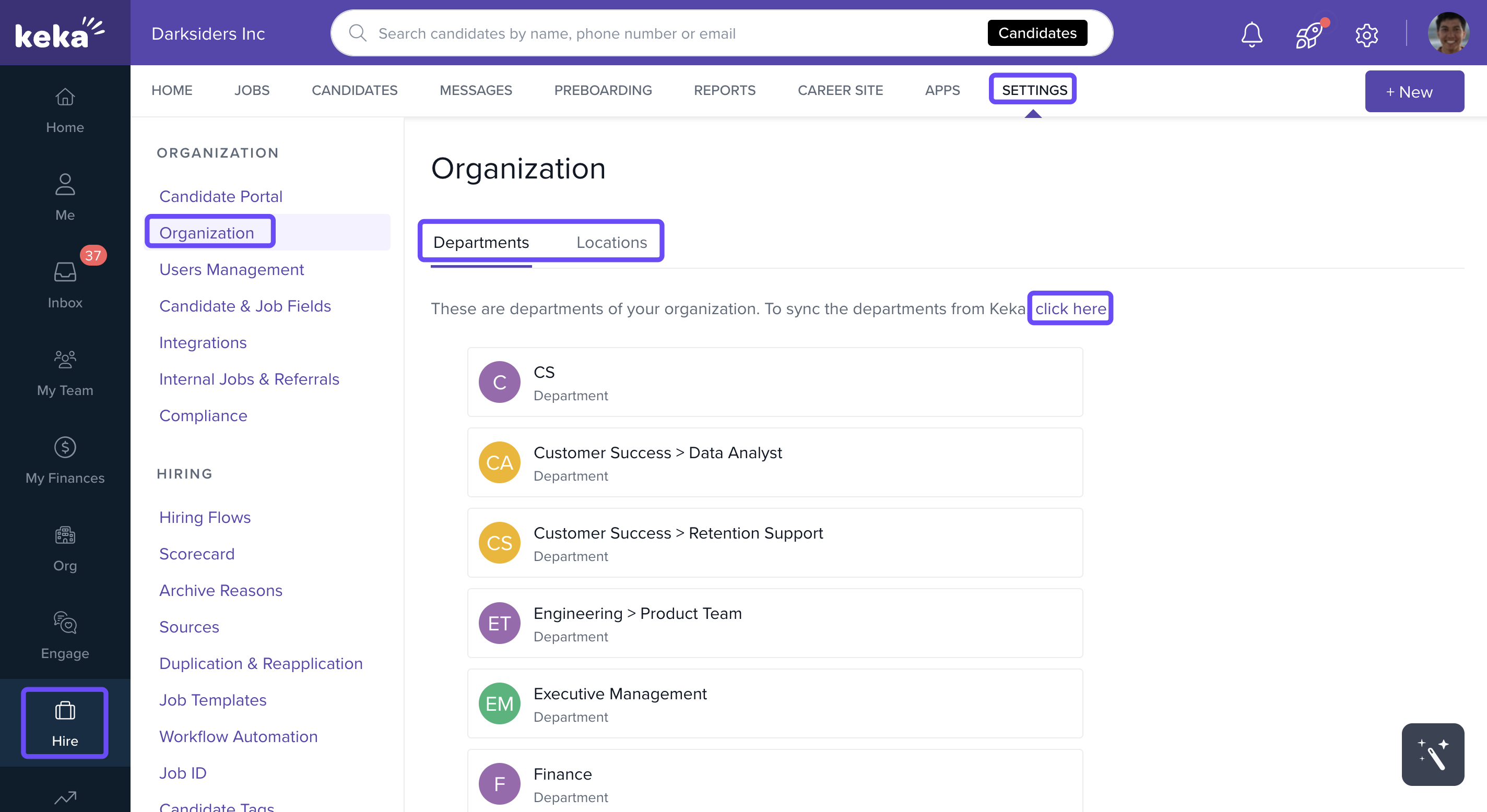
Re-sync when updates occur
If you add new departments or locations in the Keka portal later, you’ll need to click the sync button again to bring those updates into Keka Hire.
Syncing ensures consistency across Keka and Keka Hire- saving time and reducing errors- and since any new departments or locations created in your Keka portal don’t appear automatically in Keka Hire, you must re-sync to update.
Please feel free to get in touch with one of our product experts for any further queries.
Comments
0 comments
Please sign in to leave a comment.