Overview
When employees leave, HR teams often coordinate exit tasks across managers, IT, Admin, Finance, and other departments. Keka lets organisations initiate multiple employee exits and assign tasks using exit task templates.
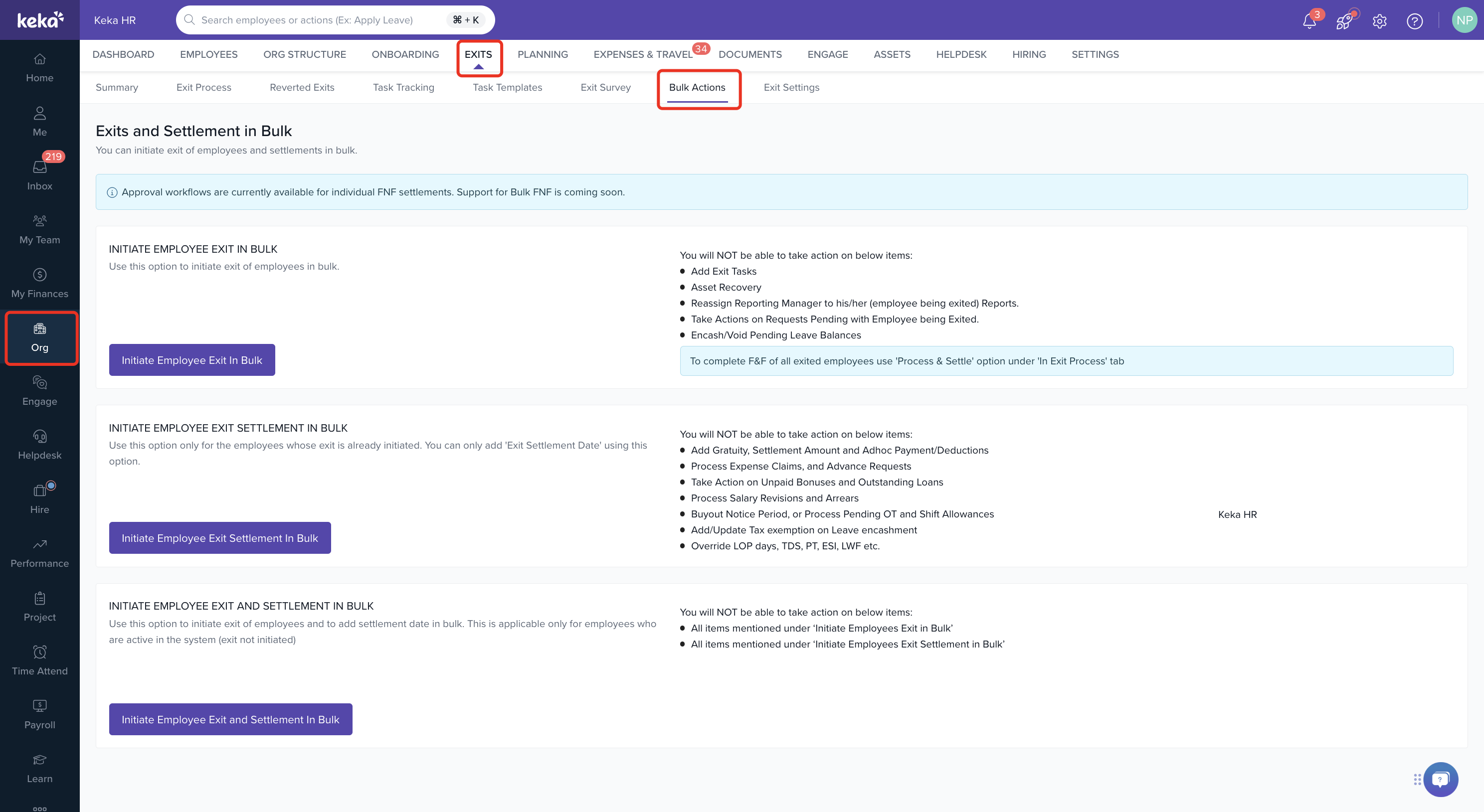
The Bulk Actions feature in the Exits module also allows HR teams to complete exit tasks for multiple employees at once.
Users with permission to manage exits and offboarding can access this feature.
The Bulk Actions page helps administrators process multiple employee exits simultaneously, reducing manual effort during large-scale offboarding.
Steps to Access Bulk Exit Actions
- Navigate to Org > Exits.
- Click Bulk Actions.
- Select the appropriate bulk exit option based on your requirement.
Available Bulk Exit Options
Initiate Employee Exit in Bulk
Use this option to initiate exits for multiple employees at once.
Initiate Employee Exit Settlement in Bulk
Use this option to configure settlement details for employees whose exit process has already been initiated.
Initiate Employee Exit and Settlement in Bulk
Use this option to simultaneously initiate employee exits and configure settlement details for multiple employees.
Assign Exit Tasks to Different Stakeholders
Exit tasks can be assigned to multiple stakeholders during offboarding.
To assign exit tasks:
- Go to Org > Exits > Exit Process.
- Select the employee.
- Click Manage.
- Under Tasks, add individual tasks or import them from a template.
- Assign the tasks to the appropriate stakeholders.
Stakeholders can view and complete their assigned tasks from their inbox.
Important Notes
Note: Exit tasks can be assigned in bulk using task templates and can be assigned to multiple stakeholders.
Note: Bulk Actions are intended to streamline employee exit processing for multiple employees.
Note: Certain actions may not be available when using bulk exit processing. As displayed in the Bulk Actions page, actions such as asset recovery, task addition, report reassignment, and some settlement-related activities may still require individual processing.
Note: Ensure all required exit activities are reviewed before finalising employee exits.
Comments
0 comments
Please sign in to leave a comment.