- Domain - The highest level of skill classification (for example, Engineering, Sales, or Finance).
- Category - Broad skill groups within a domain.
- Subcategory - More specific classifications within a category.
- Practice Area - Specialized areas of expertise within a subcategory.
- Additional Level - An optional fifth level that can be configured to meet organizational requirements.
Access the Skills Repository
- Navigate to Performance.
- Select Skills.
Click Repository.
Repository Overview
Total Skills
Displays the total number of skills available in the repository.
Total Domain Count
Employees Assigned
Understanding the Repository Structure
- Domain
- Category
- Subcategory
- Practice Area
- Additional hierarchy levels
Example Hierarchy Structure
Level Example Domain Engineering Category Software Development Subcategory Front-End Development Practice Area React Development Additional Level Advanced React Frameworks
Filter Skills Using the Hierarchy Panel
- Expand and collapse hierarchy levels.
- View Domains, Categories, Subcategories, Practice Areas, and other configured hierarchy levels.
- Filter skills based on selected hierarchy levels.
Identify uncategorised skills.
View Skills Without Levels
- Identify uncategorised skills.
- Organise existing skills.
Maintain a clean repository structure.
Search Skills
- Skill name
- Partial skill name
Keywords
Understand the Skills List
Field Description Skill Name of the skill Category Associated category or hierarchy path Employees With This Skill Number of employees assigned the skill Actions Available management actions
Manage Skills
Edit a Skill
- Locate the skill.
Click the Edit icon.
- Update the skill information.
Click Save Changes.
- Skill name
- Skill description
- Associated behaviours
Manage Behaviours
- Open the skill using the Edit option.
- Navigate to the Behaviours section.
- Add, edit, or delete behaviours.
- Choose whether each behaviour should be included in reviews.
Save your changes.
Assign a Skill to Skill Families
- Click the More Actions menu beside a skill.
Select + Assign new skill family.
- Select the appropriate hierarchy path based on your repository structure. Depending on your configuration, this may include:
- Domain
- Category
- Subcategory
- Practice Area
- Additional hierarchy levels
- Click Assign.
Add Multiple Skill Families
Click +Add New Skill Family to create additional mappings.
Delete a Skill
- Open the More Actions menu.
Click Delete.
Confirm the action.
Manage Skills in Bulk
Select Skills
- Click Select All.
Delete Skills in Bulk
- Select the required skills.
Click Delete Skills.
- Review the confirmation message.
- Click Confirm.
Important: Deleting a repository skill may affect employee skill assignments. Review existing usage before removing skills.Manage Repository Hierarchy
- Navigate to Performance > Skills > Repository.
Click Manage Skills Repository.
- Engineering
- Sales
- Customer Success
- Finance
- Review the structure.
Click Save.
Import Repository Data
Import Skills
Import Employee Skill Assignment
Import Skill Hierarchy
Add a Skill
- Navigate to Performance > Skills > Repository.
Click Add Skill.
- Enter the Skill Name.
(Optional) Add a Description to provide additional context about the skill.
Assign the skill to the appropriate hierarchy using the available skill family fields.
- Add behaviours if required.
Click Save Skill.
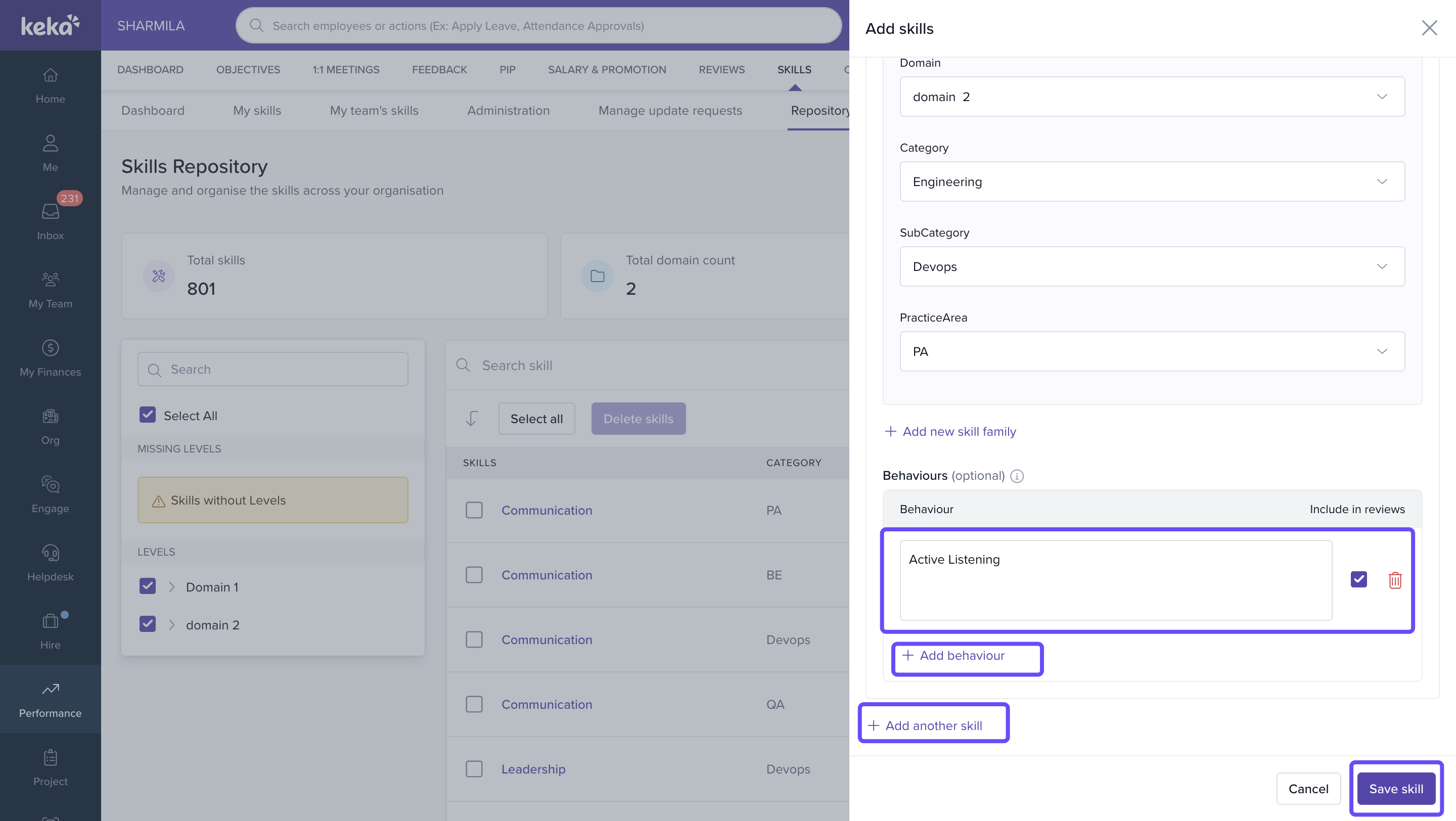
Note: A well-defined skill should include a meaningful name, appropriate hierarchy mapping, and relevant behaviours wherever applicable. This helps improve repository organization, employee skill assignments, and future reporting.Notes
- The Skills Repository supports structured skill hierarchies of up to five levels.
- Skills that are not mapped to any hierarchy appear under Skills Without Levels.
- A skill can be associated with multiple skill families.
- Repository skills can be used across employee profiles, team views, and future skills initiatives.
- Regularly review repository structure and uncategorized skills to maintain consistency.
Frequently Asked Questions
1. Can a skill be assigned to multiple skill families?
2. What are Skills Without Levels?
These are skills that are not currently mapped to any hierarchy level.
3. Can I delete multiple skills at once?
Yes. Select the required skills and use Delete Skills.
4. Can I import repository skills in bulk?
Yes. Use the Import Skills option available under Import.
5. Can I include behaviours in reviews?
Yes. Behaviours can be configured to participate in review processes.
6. Can I modify the repository hierarchy?
Yes. Use Manage Skills Repository to configure and manage up to five hierarchy levels based on your organization's skills framework.
Comments
0 comments
Please sign in to leave a comment.