Introduction
In Keka, you can manage whether employees are allowed to mark attendance under Work From Home (WFH) or On Duty (OD).
Work From Home (WFH): Typically used when employees need to work remotely due to emergencies or short-term arrangements.
On Duty (OD): Used when employees are working outside the office for work-related tasks like client visits, meetings, or fieldwork.
Not all organizations allow these options, depending on internal policies. This guide explains how to disable one or both options within a time tracking policy.
Disable Work From Home or On Duty options
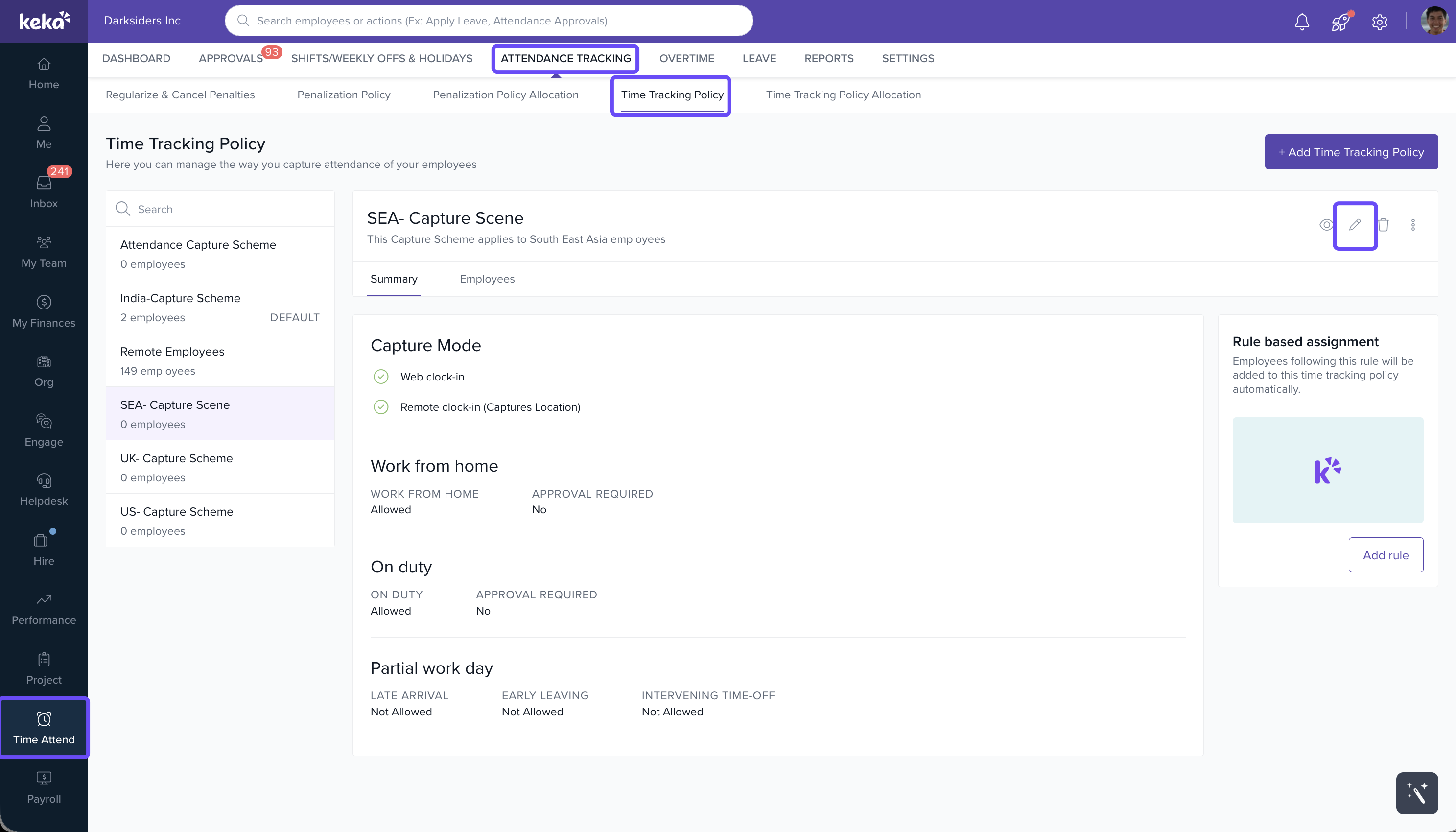
Go to the Time Attend section in the Keka portal.
Click on Attendance Tracking.
Open the Time Tracking Policy tab.
Select the relevant time tracking policy from the list.
Scroll to the Summary section.
Click the Pen icon to edit the time tracking policy.
In the multi-step settings page, go to Step 3: Remote Work.
Uncheck the box for either Work From Home or On Duty, depending on which option you want to disable.
Optionally, you can also:
Set an approver for requests.
Configure additional settings as per your policy.
Click Save to apply the changes.
Notes
Important: Disabling WFH or On Duty applies only to the selected time tracking policy. Repeat the steps for other policies if needed.
Comments
0 comments
Please sign in to leave a comment.