Overview
In this guide, you will learn:
- How to control visibility of custom fields in Projects, Opportunities, or Clients
- How enabling/disabling fields streamlines workflows and protects sensitive data
- Where to find the configuration settings for Custom Fields
Who Can Do This?
- Global Admins
- Project Admins with access to Policies & Settings in Keka PSA
Pre-requisites
- Custom fields must be created beforehand under the relevant category (Project, Opportunity, or Client)
- Appropriate admin privileges must be assigned to access Policies & Settings
Step-by-Step Instructions
Navigate to Custom Field Settings
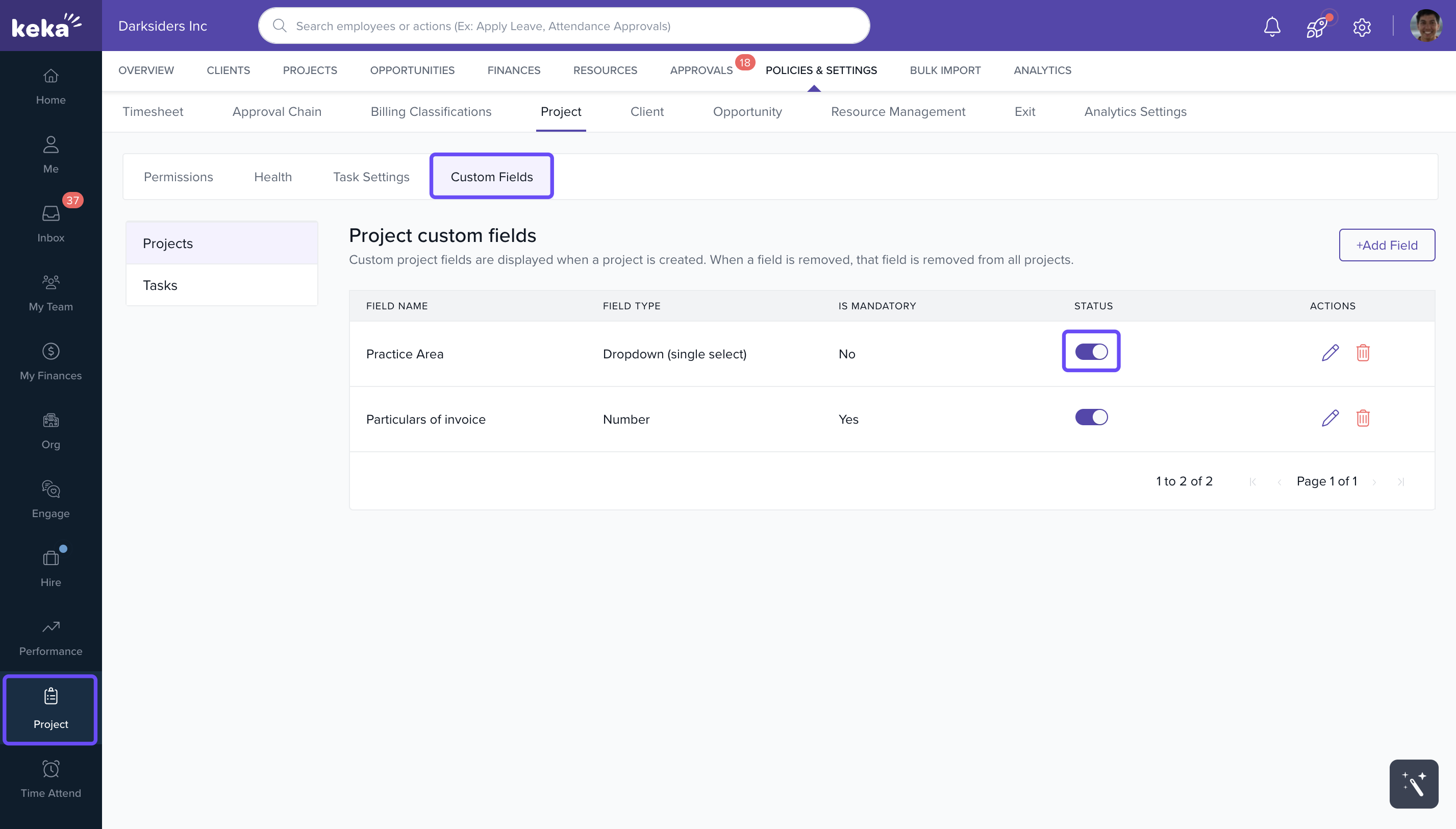
- Go to Projects from the left navigation panel.
- Click on Policies & Settings.
- Under the relevant section (e.g., Project), select Custom Fields.
Enable or Disable Field Visibility
- You will see a list of all custom fields configured for the selected entity.
- Use the Status toggle beside each field to enable (make visible) or disable (hide) the field.
- Once toggled, the field visibility will be applied across forms related to that entity.
How It Connects with Other Modules
Project & Opportunity Forms
· Visible fields will appear in project or opportunity creation/edit screens
· Helps streamline project initiation and tracking
Client Forms
· Custom fields shown on client creation/edit pages
· Useful for capturing relevant client metadata without clutter
FAQs
-
Q: Will disabling a field delete its data?
A: No. Disabling hides the field from the UI but retains the data in the backend. -
Q: Can I enable a field later after disabling it?
A: Yes. You can re-enable a custom field anytime using the toggle. -
Q: Who can configure field visibility?
A: Only users with Admin privileges for Projects, Opportunities, or Clients can do this. -
Q: Are there separate fields for Projects and Clients?
A: Yes. Custom fields are grouped by entity—Project, Opportunity, or Client. -
Q: Can I reorder custom fields in the form?
A: No. Currently, only enable/disable options are available, not reordering.
Troubleshooting
-
Unable to see a custom field in the project form?
· Check if the field is disabled in Policies & Settings > Custom Fields
· Verify your admin permissions -
Field appears for some users but not others?
· Check role-based access or visibility rules, if any
Comments
0 comments
Please sign in to leave a comment.