Performance Admins and Global Admins can now bulk import goal templates directly into Keka, making it easier than ever to set up structured and categorised goals for your teams. This enhancement is ideal for organisations managing large volumes of recurring goals across departments.
How to Bulk Import Goal Templates
Access the Performance section and select Objectives. Once in Objectives, proceed to Settings and click on Templates.
Click the Import goal templates dropdown on the top right.
Download the Excel template provided.
Fill in the sheet with goal names, sub-goals, categories, and progress metrics.
Enter:
Goal names and sub-goals
Associated categories
Progress tracking metrics (e.g., % completion, numeric values, milestones)
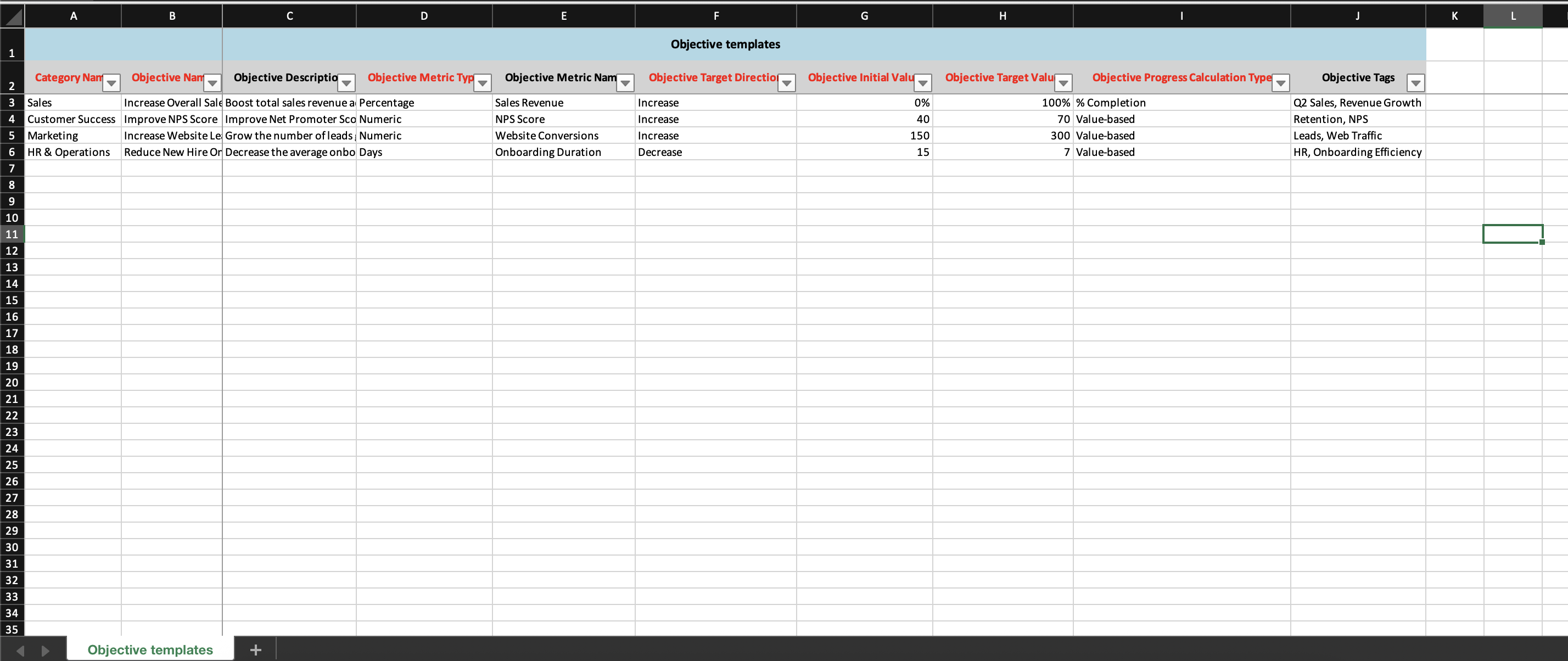
Upload the completed Excel file to bulk create goal templates in the system.
Then proceed to match the columns to ensure fields from your Excel sheet map correctly with Keka fields and click on Continue once done.
- The system will validate the data. Any errors will be shown in red. You can correct them in the Excel file and re-upload if needed.
Once all validations pass, click Complete.
Then Confirm on the popup to finalise the import.
Thus, the bulk import feature for goal templates with categories significantly reduces manual effort and ensures consistency in goal-setting across teams. With just a few simple steps, admins can quickly set up structured, recurring goals—saving time and driving alignment across the organisation.
Comments
0 comments
Please sign in to leave a comment.