Introduction
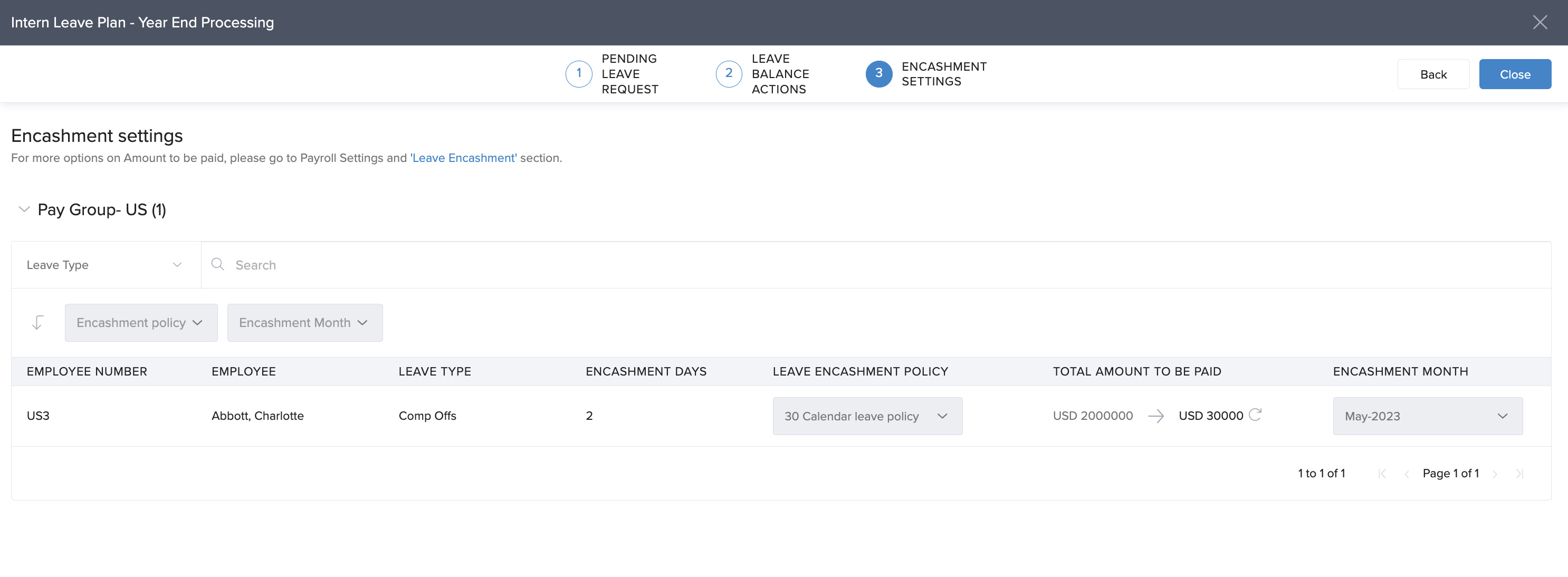
If your organization doesn’t offer leave encashment, you can still complete Year-End Processing (YEP) in Keka. The system requires a leave encashment policy—so setting up a default, non-financial one is necessary to proceed.
This guide walks you through the steps to finalize your year-end leave records without impacting your existing leave policies.
Leave encashment policy for Year-End Processing
Create a default leave encashment policy
Even if you don't use leave encashment, Keka requires a policy to enable Year-End Processing.
Set up a nominal or placeholder leave encashment policy.
This policy won’t trigger any payouts or changes—it’s just a procedural requirement.
Clear pending leave requests
Make sure all leave requests are either approved or rejected before continuing.
This ensures leave balances are up-to-date and carry over correctly into the new year.
Review and manage leave balances
Before finalizing:
Check that carryforward balances are accurate.
Confirm if any leave expiry rules are applied as per your policy.
Adjust balances manually if needed.
Finalize Year-End Processing
Once the default encashment policy is in place and pending items are addressed:
You’ll see the Finalize button enabled.
Click Finalize to close out the current year’s leave records.
Notes, Tips, Important, Warnings
Note: Setting up a default encashment policy won’t affect payroll or employee balances. It only satisfies a system requirement to complete YEP.
Tip: Keep your leave policy documentation updated for future audits or internal reference.
Comments
0 comments
Please sign in to leave a comment.